Modify The Service
Update the Swagger Contract with New Endpoints
Now that you have a successful build, let’s next look at how an update to the service’s swagger contract would be performed.
We design our services by creating the contract for our public endpoints first. This enables conversations with those who depend on our services earlier in the development process, as well as allowing a natural moment to consider the design warranted for each service.
The swagger contract in the starter-service (src/main/resources/swagger.json) needs to be updated to support two new endpoints:
-
PUT /session/values/{key}
-
GET /session/values/{key}
There are many ways to modify the swagger contract, including using any text editor, or Visual Studio Code/intelliJ with helpful extensions/plugins. If you have never worked with swagger documents before, the quickest way to gain an understanding may be to paste the existing contract into the swagger editor at https://swagger.io/tools/swagger-editor/. At https://swagger.io, you can learn more about the Swagger project and the Swagger/OpenAPI spec.
| When you first built your service, you may have noticed that an openapi.json file was generated in the resources directory alongside the swagger.json file. This file is generated from the swagger.json service contract to be used for endpoint cataloging only, and therefore should not be edited. The swagger contract defined in swagger.json is the source of truth for the service API definition and should be the only file edited when making changes to the service API. |
Here is what the service contract should look like after the two new endpoints are added to starter-service/src/main/resources/swagger.json:
{
  "openapi": "3.0.3",
  "info": {
    "version": "@starter-service-client.version@",
    "title": "starter-service"
  },
  "tags": [
    {
      "name": "Starter"
    }
  ],
  "security": [
    {
      "requireVamfJwtKey": []
    }
  ],
  "servers": [
    {
      "description": "SQA",
      "url": "https://staff.apps-staging.va.gov/starter/v1"
    },
    {
      "description": "PROD",
      "url": "https://staff.apps.va.gov/starter/v1"
    }
  ],
  "paths": {
    "/patients/{icn}/info": {
      "get": {
        "tags": [
          "Starter"
        ],
        "description": "Retrieves the patient information.",
        "operationId": "getPatientInfo",
        "parameters": [
          {
            "name": "icn",
            "in": "path",
            "description": "The identifier of the patient to retrieve info for.",
            "required": true,
            "schema": {
              "type": "string"
            }
          }
        ],
        "responses": {
          "200": {
            "description": "Successful response",
            "content": {
              "application/json": {
                "schema": {
                  "$ref": "#/components/schemas/PatientInfoResponse"
                }
              }
            }
          },
          "default": {
            "description": "Error payload"
          }
        }
      }
    },
    "/session/values/{key}": {
      "summary": "Put and Get Session values.",
      "description": "These methods allows apps and services to PUT and GET session values for this user. It will *not* accept requests from browsers (i.e. User-Agent       contains 'Mozilla') in order to prevent potential XSS threats.",
      "parameters": [
        {
          "name": "key",
          "in": "path",
          "description": "The identifier for the session.",
          "required": true,
          "schema": {
            "type": "string"
          }
        }
      ],
      "get": {
        "summary": "Get a session value for this user/session.",
        "description": "This method allows apps and services to retrieve session values for this user. It will *not* accept requests from browsers (i.e. User-Agent       contains 'Mozilla') in order to prevent potential XSS threats.",
        "operationId": "getSessionValue",
        "responses": {
          "200": {
            "description": "Key value pair was successfully set.",
            "content": {
              "application/json": {
                "schema": {
                  "type": "string"
                }
              }
            }
          },
          "401": {
            "description": "Token Required"
          },
          "403": {
            "description": "Not Allowed"
          },
          "404": {
            "description": "Not Found"
          }
        },
        "tags": [
          "Session"
        ]
      },
      "put": {
        "summary": "Set a key/value pair for this user/session.",
        "description": "This method allows apps and services set session values for this user. It will *not* accept requests from browsers (i.e. User-Agent contains 'Mozilla') in order to prevent potential XSS threats.",
        "operationId": "setSessionValue",
        "requestBody": {
          "content": {
            "application/json": {
              "schema": {
                "type": "object",
                "properties": {
                  "value": {
                    "description": "Value for the key",
                    "type": "string"
                  }
                }
              }
            }
          }
        },
        "responses": {
          "202": {
            "description": "Key value pair was successfully set."
          },
          "401": {
            "description": "Token Required"
          },
          "403": {
            "description": "Not Allowed"
          },
          "404": {
            "description": "Not Found"
          }
        },
        "tags": [
          "Session"
        ]
      }
    }
  },
  "components": {
    "securitySchemes": {
      "requireVamfJwtKey": {
        "type": "apiKey",
        "in": "header",
        "name": "X-VAMF-JWT"
      }
    },
    "schemas": {
      "PatientInfo": {
        "type": "object",
        "required": [
          "icn"
        ],
        "properties": {
          "icn": {
            "type": "string",
            "description": "Patient ICN identifier"
          },
          "firstName": {
            "type": "string",
            "description": "Patient first name"
          },
          "lastName": {
            "type": "string",
            "description": "Patient last name"
          },
          "dateOfBirth": {
            "type": "string",
            "description": "Patient date of birth"
          }
        }
      },
      "ErrorResponse": {
        "type": "object",
        "required": [
          "errors"
        ],
        "properties": {
          "status": {
            "type": "integer",
            "description": "Overall Error status"
          },
          "errors": {
            "$ref": "#/components/schemas/Error"
          }
        }
      },
      "Error": {
        "type": "object",
        "required": [
          "status",
          "code"
        ],
        "properties": {
          "status": {
            "type": "integer",
            "description": "Error status"
          },
          "code": {
            "type": "string",
            "description": "Error code"
          },
          "detail": {
            "type": "string",
            "description": "Error detail"
          }
        }
      },
      "PatientInfoResponse": {
        "type": "object",
        "required": [
          "data"
        ],
        "properties": {
          "data": {
            "$ref": "#/components/schemas/PatientInfo"
          }
        }
      }
    }
  }
}
Take a moment to observe the following about the swagger contract modifications made above:
-
Make note of the values used for the
operationIdfields in the new endpoints, as these will be used when generating the request model objects from the contract. TheoperationIdvalues should be unique across the entire swagger contract, and should be descriptive of the endpoint’s purpose. -
Also note the added
tagsfield for the new endpoints, which is used to group endpoints together in the generated client code. In this case, we used "Session" as the tag for the new endpoints, which will cause them to be grouped together in aSessionApiclass in the generated client code.
At this point the project could be rebuilt, but we haven’t yet placed an actual controller behind our newly created endpoints. When you rebuild the service, the client package will parse the swagger contract and generate the API client and domain model objects. However, if the new endpoints were accessed, the result at this time would just be a 404 error.
Create a Controller for the New Endpoints
Under package gov.va.mobile.starter.v1.service.controller, create a new class named UserSessionController. Implement mappings for both the GET and the PUT endpoints we just added to the swagger contract. For now, it can just return an empty response, and we will return to an implementation later on in the project tutorial.
The implementation class should look roughly like this:
package gov.va.mobile.starter.v1.service.controller;

import org.springframework.http.HttpStatus;
import org.springframework.http.ResponseEntity;
import org.springframework.web.bind.annotation.GetMapping;
import org.springframework.web.bind.annotation.PathVariable;
import org.springframework.web.bind.annotation.PutMapping;
import org.springframework.web.bind.annotation.RequestMapping;
import org.springframework.web.bind.annotation.RestController;

/**
 * REST endpoint that allows clients to retrieve session data.
 *
 * @since 1.0
 */
@RestController
@RequestMapping(path = "/session/values/{key}")
public class UserSessionController {


    /**
     * Retrieves a session value based on the provided key.
     */
    @GetMapping
    public ResponseEntity<String> getSessionValue(@PathVariable final String key) {

        //stubbed out for now
        return new ResponseEntity<>(HttpStatus.OK);
    }

    /**
     * Updates or creates a session value based on the provided key.
     */
    @PutMapping
    public ResponseEntity<String> putSessionValue(@PathVariable final String key) {

        //stubbed out for now
        return new ResponseEntity<>(HttpStatus.OK);
    }
}
Now you can run the service with the skaffold dev command and hit the new endpoints. The response will be empty with a 200 OK status.
You should take this opportunity to inspect the generated client code for these endpoints in the starter-service-client package (starter-service-client/target/generated-sources/src/main/java/gov/va/mobile/starter/v1) to see how the swagger contract translates into client code.
|
Integrating With Another Service
The starter-service’s example route of patients/{icn}/info is documented to return information about a user for the provided ICN (a type of identifier). However, it is not returning the correct information; it is instead returning the name information from the JWT and the ICN value passed in from the request. In order to retrieve the correct information, we need to integrate the mobile-mvi-service as a dependency in our service. Since this service contacts the VA’s master veteran index (MVI) service, we will need to mock out a response from this service using wiremock.
To add mobile-mvi-service to your project, you’ll need to make the following modifications:
-
Add
mobile-mvi-client.versionas a property in the service’s pom.xml -
Add
mobile-mvi-clientas a provided dependency to pom.xml -
Add
wiremock-httpclient-apache5as a test dependency to pom.xml -
Add the
wiremockservice as a dependency to the service’s kubernetes configuration for use during testing -
Update the application.properties file to add the Rest configuration for the
mobile-mvi-servicebase URL -
Update the application-dev.properties file to override the
mobile-mvi-servicebase URL to point to the wiremock service -
Add a port forward for wiremock to skaffold.yaml
-
Add the
mobile-mvi-servicedependency to the list of dependencies in the README.md
To start, add the following property and dependencies to starter-service’s pom.xml in the appropriate sections:
<properties>
...
    <mobile-mvi-client.version>1.49</mobile-mvi-client.version>
...
</properties>

<dependencies>
...
    <!-- Clients -->
    <dependency>
        <groupId>gov.va.mobile.client.openapi</groupId>
        <artifactId>mobile-mvi-client</artifactId>
        <version>${mobile-mvi-client.version}</version>
    </dependency>
...
    <!-- Test Dependencies -->
    <dependency>
        <groupId>org.wiremock</groupId>
        <artifactId>wiremock-httpclient-apache5</artifactId>
        <scope>test</scope>
    </dependency>
...
</dependencies>
Next, add wiremock as a service dependency in the kubernetes/dev-with-dependencies/kustomization.yaml file. This will pull the wiremock service from its git repository and configure it for use with skaffold and kustomize:
apiVersion: kustomize.config.k8s.io/v1beta1
kind: Kustomization

resources:
- https://coderepo.mobilehealth.va.gov/scm/ckm/common-app-config.git//dev?ref=main


components:
- https://coderepo.mobilehealth.va.gov/scm/ckm/wiremock.git//kubernetes?ref=Release/3.13.2&timeout=60s
- ../components/dev
Add the following property to starter-service/src/main/resources/application.properties. This property allows Mobile Framework’s RestClientManager to configure a RestClient for the mobile-mvi-service with the appropriate base URL:
va.mobile.restclient.registration.mobile-mvi-service.url=http://mobile-mvi-service-v1:8080/mvi/v1Now, override the same property in starter-service/src/main/resources/application-dev.properties to point to the wiremock service in your development environment. This will allow the service to use the wiremock service instead of the actual mobile-mvi-service during development and testing:
va.mobile.restclient.registration.mobile-mvi-service.url=http://wiremock:8080/mvi/v1Lastly, add a port forward for wiremock to skaffold.yaml in order for it to be available to our integration tests:
...
portForward:
- resourceType: service
  resourceName: starter-service-v1
  port: 8080
- resourceType: deployment
  resourceName: starter-service-v1
  port: 8081
- resourceType: deployment
  resourceName: starter-service-v1
  port: 6300
- resourceType: service
  resourceName: wiremock
  port: 8080
  localPort: 8084
...
That’s all the configuration changes needed to add the mobile-mvi-service and wiremock dependencies to your service. Since you will be mocking responses from mobile-mvi-service, it is not necessary to add it as a running service in your cluster. If you run the service at this point using skaffold dev, you will see starter-service and wiremock initialized as docker containers once startup completes by executing a docker ps:
CONTAINER ID   IMAGE          COMMAND                  CREATED          STATUS          PORTS     NAMES
ee8adb88c7fe   cb94f7a4f456   "/docker-entrypoint.…"   39 seconds ago   Up 38 seconds             k8s_wiremock_wiremock-7459bc54dc-k2n5d_starter-service-test_6e207ac7-f3b9-443c-9737-f086448ea5f8_0
ab3a2130a37f   6e9805aff57e   "java -javaagent:/ap…"   39 seconds ago   Up 38 seconds             k8s_starter-service_starter-service-v1-6bd7fb5b7-m6d45_starter-service-test_5915f353-8991-4be1-bbaf-e224862aa207_0
Modify the Patient Info Endpoint
Now that the configuration is updated, we can get details about a patient via their ICN number from the mobile-mvi-service client instead of reading it from the logged-in user JWT. To do this, we will create a client wrapper class to interact with the mobile-mvi-service, and then call its getVeteranDemographics method to get a Person object. The data from this Person object will then be set on a PatientInfoResponse instance and returned.
Create a new package at the same level as controller named client, and within that package create a new Java class named MviClient. This class will be responsible for interacting with the mobile-mvi-service RestClient to retrieve patient information. Copy the following code into the MviClient.java class:
package gov.va.mobile.starter.v1.service.client;

import gov.va.mobile.boot.restclient.RestClientManager;
import gov.va.mobile.mvi.v1.model.Person;
import gov.va.mobile.security.HeaderNames;
import lombok.extern.slf4j.Slf4j;
import org.jspecify.annotations.Nullable;
import org.springframework.stereotype.Component;
import org.springframework.web.client.HttpClientErrorException;
import org.springframework.web.client.HttpServerErrorException;
import org.springframework.web.client.RestClient;

import static gov.va.mobile.Sanitizer.sanitize;

/**
 * A client wrapper for the Mobile MVI Service.
 */
@Slf4j
@Component
public class MviClient {

    private static final String SENDER_ID = "200CIH";

    private final RestClient restClient;

    /**
     * Constructor for MviClient.
     *
     * @param restClientManager the RestClientManager used to obtain a RestClient for the Mobile MVI Service
     */
    public MviClient(final RestClientManager restClientManager) {
        restClient = restClientManager.getClient("mobile-mvi-service");
    }

    /**
     * Retrieves Patient Person demographic data from MVI by ICN. The authorized JWT is propagated to Mobile MVI Service.
     * <p>
     * The underlying query is a 1305 request.
     *
     * @param icn ICN of the veteran to find identifiers for.
     * @param jwt JWT to allow access to mobile mvi service
     * @return the Person model for the patient
     */
    public @Nullable Person getVeteranDemographics(final String icn, final String jwt) {

        try {
            return restClient.get()
                             .uri("/patients/ICN/{id}/mvi/person?senderId={senderId}", icn, SENDER_ID)
                             .header(HeaderNames.VAMF_JWT_HEADER, jwt)
                             .retrieve()
                             .body(Person.class);
        } catch (HttpClientErrorException.NotFound | HttpServerErrorException.InternalServerError e) {
            // mobile-mvi-service using wiremock will respond with a 500 for non-existent patients, so we add
            // InternalServerError to this catch block to handle that test condition
            final String cleanIcn = sanitize(icn);
            log.error("Could not fetch demographics for ICN {}", cleanIcn);
            return null;
        }
    }
}
Note that the constructor for this class takes in a RestClientManager, which is used to obtain a RestClient instance that is configured to interact with the mobile-mvi-service based on the property we added to application.properties earlier. This RestClient is used by the getVeteranDemographics method to call to the mobile-mvi-service to retrieve demographic information about the patient associated with the provided ICN. The passed in JWT is propagated in the call to the mobile-mvi-service to allow for proper authentication and authorization when accessing the service.
Now, update ServiceController.java to resemble the code below. Make note of the following changes:
-
The addition of an MviClient instance, which is wired into the service via the added
@AllArgsConstructorannotation -
Update to the
getInfomethod signature to include the JWT from thex-vamf-jwtheader, which is then passed into thegetVeteranDemographicsmethod of the MviClient instance to retrieve the Person object for the provided ICN -
Logic updates to use the Person object returned from the MviClient to populate the PatientInfoResponse object that is returned to the caller. If no Person object is found, a 404 Not Found response is returned.
package gov.va.mobile.starter.v1.service.controller;

import gov.va.mobile.mvi.v1.model.Person;
import gov.va.mobile.security.HeaderNames;
import gov.va.mobile.security.web.jwt.JwtRestricted;
import gov.va.mobile.starter.v1.model.PatientInfo;
import gov.va.mobile.starter.v1.model.PatientInfoResponse;
import gov.va.mobile.starter.v1.service.client.MviClient;
import lombok.AllArgsConstructor;
import org.springframework.http.MediaType;
import org.springframework.http.ResponseEntity;
import org.springframework.web.bind.annotation.GetMapping;
import org.springframework.web.bind.annotation.PathVariable;
import org.springframework.web.bind.annotation.RequestHeader;
import org.springframework.web.bind.annotation.RequestMapping;
import org.springframework.web.bind.annotation.RestController;

/**
 * REST endpoint that allows clients to retrieve Patient Information.
 *
 * @since 1.0
 */
@RestController
@AllArgsConstructor
@JwtRestricted(checkResource = true)
@RequestMapping(path = "/patients/{icn}")
public class ServiceController {

    /**
     * RestClient instance for interacting with the Mobile MVI Service.
     */
    private final MviClient mviClient;

    /**
     * Returns the Patient Information {@link PatientInfoResponse} associated with the provided ICN Identifier.
     *
     * @param icn
     *         the ICN Identifier used to retrieve the {@link PatientInfoResponse}
     * @param jwt
     *         the JWT from the x-vamf-jwt header.
     *
     * @return ResponseEntity wrapped with PatientInfoResponse {@link PatientInfoResponse}
     *
     * @see PatientInfoResponse
     */
    @GetMapping(value = "/info", produces = MediaType.APPLICATION_JSON_VALUE)
    public ResponseEntity<PatientInfoResponse> getInfo(@PathVariable("icn") final String icn,
                                                       @RequestHeader(HeaderNames.VAMF_JWT_HEADER) final String jwt) {

        final Person person = mviClient.getVeteranDemographics(icn, jwt);
        if (person == null) {
            return ResponseEntity.notFound().build();
        }

        final PatientInfo info = new PatientInfo();
        info.setFirstName(person.getFirstName());
        info.setLastName(person.getLastName());
        info.setDateOfBirth(person.getBirthTime());
        info.setIcn(icn);
        final PatientInfoResponse response = new PatientInfoResponse();
        response.setData(info);

        return ResponseEntity.ok(response);
    }
}
Load the Mock MVI Data for Testing
Because we need to mock a response from mobile-mvi-service in order to test this code, we need to load some mock MVI data into our wiremock registry.
To load the mock data and make it available for testing, update BaseITCase.java as below to create a WireMock client and use it to load mock data for the veteran demographics endpoint called by your MviClient, as well as a mock health check response for mobile-mvi-service.
package gov.va.mobile.starter.v1.service;

import com.fasterxml.jackson.databind.json.JsonMapper;
import com.github.tomakehurst.wiremock.client.WireMock;
import com.github.tomakehurst.wiremock.common.ContentTypes;
import gov.va.mobile.mvi.v1.model.Person;
import gov.va.mobile.tools.skaffold.SkaffoldTestSupport;
import org.junit.jupiter.api.BeforeAll;
import org.springframework.http.HttpHeaders;

import java.io.IOException;

import static com.github.tomakehurst.wiremock.client.WireMock.get;
import static com.github.tomakehurst.wiremock.client.WireMock.ok;
import static com.github.tomakehurst.wiremock.client.WireMock.urlEqualTo;

/**
 * Base Class for the starter-service Integration Test Cases.
 *
 * @since 1.0
 */
public abstract class BaseITCase {

    /**
     * Veteran ICN for testing.
     */
    protected static final String VET_ICN = "100031V310296";

    /**
     * Sender ID for testing.
     */
    private static final String SENDER_ID = "200CIH";

    /**
     * JSON Mapper for serializing and deserializing JSON.
     */
    private static final JsonMapper JSON_MAPPER = JsonMapper.builder().build();

    /**
     * The endpoint url for the service endpoints.
     *
     * @return the endpoint url
     */
    protected static String getServiceUrl() {
        return SkaffoldTestSupport.getServiceUrl("starter-service-v1", 8080, "/starter/v1");
    }

    /**
     * The endpoint url for the service actuator endpoints.
     *
     * @return the endpoint url
     */
    protected static String getActuatorUrl() {
        return SkaffoldTestSupport.getServiceUrl("starter-service-v1", 8081);
    }

    /**
     * Initialize WireMock stubs for MVI before all tests.
     *
     * @throws Exception if an error occurs during initialization
     */
    @BeforeAll
    public static void init() throws Exception {
        final WireMock wireMock = WireMock
                .create().host(SkaffoldTestSupport.getHost("wiremock"))
                .port(SkaffoldTestSupport.getPort("wiremock", 8080))
                .build();

        mockVeteranDemographics(wireMock, VET_ICN, SENDER_ID, "John", "Doe");
        mockSuccessfulHealthCheck(wireMock);
    }

    /**
     * Mocks the veteran demographics response for a given ICN and sender ID.
     *
     * @param wireMock the wiremock client
     * @param icn the ICN of the veteran
     * @param senderId the sender ID
     * @param firstName the first name of the veteran
     * @param lastName the last name of the veteran
     * @throws IOException if an I/O error occurs
     */
    public static void mockVeteranDemographics(final WireMock wireMock, final String icn, final String senderId, final String firstName, final String lastName) throws IOException {
        final Person person = new Person();
        person.setFirstName(firstName);
        person.setLastName(lastName);
        wireMock.register(
                get(urlEqualTo("/mvi/v1/patients/ICN/%s/mvi/person?senderId=%s".formatted(icn, senderId)))
                        .willReturn(ok(JSON_MAPPER.writeValueAsString(person))
                                            .withHeader(HttpHeaders.CONTENT_TYPE, ContentTypes.APPLICATION_JSON)));
    }

    /**
     * Registers MVI health check mock.
     *
     * @param wireMock
     *         the wiremock client
     */
    public static void mockSuccessfulHealthCheck(final WireMock wireMock) {
        wireMock.register(get(urlEqualTo("/mvi/v1/version")).willReturn(ok().withBody("mockMviSvcV1")));
    }
}
Modify Tests for Patient Info Endpoint
Since you have updated the code in ServiceController.java, the example test in ServiceControllerITCase.java is now incorrect and needs to be updated. Below is an example implementation of the getPatientInfo test for a patient (veteran) user.
package gov.va.mobile.starter.v1.service;

import gov.va.mobile.boot.restclient.test.RestClientUtils;
import gov.va.mobile.security.HeaderNames;
import gov.va.mobile.security.jwt.test.JwtTestUtils;
import gov.va.mobile.security.jwt.v2.JwtUserV2;
import gov.va.mobile.starter.v1.model.PatientInfoResponse;
import org.junit.jupiter.api.Test;
import org.springframework.web.client.RestClient;

import java.util.List;

import static org.assertj.core.api.Assertions.assertThat;

/**
 * Integration Test cases for the {@code "/patients/{icn}/info"} REST endpoint.
 *
 * @since 1.0
 */
class ServiceControllerITCase extends BaseITCase {

    /**
     * 200 response - Patient is able to get self data.
     */
    @Test
    void testGetPatientInfoAsVeteranUser() {
        final JwtUserV2 user = JwtTestUtils.V2
                .createVeteranUserBuilder()
                .authorizedResources(List.of(String.format("/patients/%s/info", VET_ICN)))
                .build();

        final RestClient restClient = buildRestClient(user);

        final PatientInfoResponse response = restClient
                .get()
                .uri("/patients/{icn}/info", VET_ICN)
                .retrieve()
                .body(PatientInfoResponse.class);

        assertThat(response).isNotNull();
        assertThat(response.getData()).isNotNull();
        assertThat(response.getData().getFirstName()).isEqualTo("John");
        assertThat(response.getData().getLastName()).isEqualTo("Doe");
    }

    /**
     * 200 response - Staff is able to get patient data.
     */
    @Test
    void testGetPatientInfoAsStaffUser() {
        //TODO: implement
    }

    /**
     * 401 response - no JWT is present.
     */
    @Test
    void testFailWithoutJWT() {
        //TODO: implement
    }

    /**
     * 403 response - no permissions.
     */
    @Test
    void testFailWithNoPermissions() {
        //TODO: implement
    }

    /**
     * 404 response - person not found.
     */
    @Test
    void testFailWithPersonNotFound() {
        //TODO: implement
    }

    private static RestClient buildRestClient(final JwtUserV2 user) {
        return RestClientUtils.createBuilder()
                              .baseUrl(getServiceUrl())
                              .defaultHeader(HeaderNames.VAMF_JWT_HEADER, JwtTestUtils.generateJwt(user))
                              .build();
    }
}
Go ahead and execute a full build of the service with ./mvnw clean verify -Pwith-skaffold to make sure the new code and tests compile. However, since we added logic to the ServiceController, you should see a failure at the end of your build due to unmet code coverage checks. We will address that next.
Implement Integration Tests
In order to get a successful build, you need to implement the integration tests outlined in the code above:
-
Test for a staff user able to access the test veteran’s patient info
-
Test for no JWT present (you will need to create a RestClient without the JWT header for this test)
-
Test for no permissions (this endpoint is resource restricted)
-
Test for a 404 response when the person is not found in MVI (use a non-existent ICN for this test)
As you implement these tests, be mindful of opportunities to reuse code to avoid duplication. The buildRestClient method is a good example; it’s generally useful, so take this opportunity to move it over to your BaseITCase class for other test classes to use moving forward. Also explore the builders and helpers available in the JwtTestUtils and RestClientUtils classes to help with generating the JWTs and RestClient instances needed for the tests.
Once you have implemented the tests, run a full build of the service again with ./mvnw clean verify -Pwith-skaffold to make sure your coverage checks are met and the build is successful.
If you have failing integration tests or need help understanding your test’s behavior/execution, you can set up a Remote JVM Debugger in your IDE as detailed in the debug guide. Then you can start the service with skaffold debug and run the integration tests from your IDE with breakpoints set in your application code to inspect the behavior and debug any issues.
|
Because the /patients/{icn}/info endpoint is mocked, if you bring up your service now with skaffold dev and try to hit this endpoint in Postman or via curl, you will receive a 500 error, as the mocks are only initialized during the integration test phase.
|
Testing Ideals
Our testing philosophy combines unit and integration testing to verify the amount of coverage we have around our endpoints. When considered holistically like this, we are able to value test coverage as a meaningful metric regarding the state of our services. Therefore, we attempt to use real services as much as possible, using mocks only when necessary, and often only when retrieving data from external systems, as is the case in our starter-service. Unit tests are secondary to integration tests, and are usually only needed for code that is difficult to cover in integration tests.
Jacoco Coverage Report
To help you visualize your test coverage, you can generate the Jacoco coverage report by executing a full maven build with the verify or install goals:
./mvnw clean verify -Pwith-skaffold
or
./mvnw clean install -Pwith-skaffold
This will generate a report at target/site/jacoco-aggregate/index.html that you can open in a browser to see the coverage details.
Implement The New User Session Endpoints
Next, we return to the two stubbed-out endpoints we created earlier in UserSessionController.java.
-
The PUT endpoint should use
user-session-serviceand its generated client to save a sanitized user input (key/value pair) into a session variable. This endpoint should be restricted to only Staff users. The term we use for this type of access control is RBAC (Role-Based Access Control). -
The GET endpoint should return the session value for the requested key, and should be restricted to only those who have permission to access that specific endpoint. This is known as Resource-Based Access Control. Although the acronym RBAC is suitable for each, this type of control is simplified just as “resource” control.
In order to add user-session-service to your project, the following steps will need to be taken. Note that we are going to deploy this service to your cluster and interact with it, rather than mocking it out.
-
Add
session-service-client.versionas a build property andsession-service-clientas a client dependency to the pom.xml. -
Add the
redisanduser-session-servicedependencies to the service’s kubernetes configuration. User Session Service depends on Redis, so we need to add both of these services to our cluster in order for the user-session-service to function properly. -
Add the required property for the
user-session-servicebase URL to application.properties. -
Add the user-session-service dependency to the list of dependencies in the README.md
Following the steps above, add the following to the pom.xml file in the appropriate sections:
<properties>
...
  <session-service-client.version>1.32</session-service-client.version>
...
</properties>

<dependencies>
...
<dependency>
  <groupId>gov.va.mobile.client.openapi</groupId>
  <artifactId>session-service-client</artifactId>
  <version>${session-service-client.version}</version>
</dependency>
...
</dependencies>
Add the following to the kubernetes/dev-with-dependencies/kustomization.yaml file in the appropriate section:
...
components:
- https://coderepo.mobilehealth.va.gov/scm/dhsss/redis.git//kubernetes?ref=v7.2.12&timeout=60s
- https://coderepo.mobilehealth.va.gov/scm/iums/user-session-service.git//kubernetes/components/dev?ref=Release/1.32&timeout=60s
...
Lastly, add the RestClient configuration for the user-session-service to application.properties:
va.mobile.restclient.registration.user-session-service.url=http://user-session-service-v1:8080/session/v1Now that user-session-service is wired in, we can make some code updates. To interact with the user-session-service, we will again create a client wrapper class named SessionClient in the gov.va.mobile.starter.v1.service.client package, similar to the MviClient we created earlier.
package gov.va.mobile.starter.v1.service.client;

import gov.va.mobile.boot.restclient.RestClientManager;
import gov.va.mobile.security.HeaderNames;
import lombok.extern.slf4j.Slf4j;
import org.jspecify.annotations.Nullable;
import org.springframework.stereotype.Component;
import org.springframework.web.client.HttpClientErrorException;
import org.springframework.web.client.HttpServerErrorException;
import org.springframework.web.client.RestClient;

import static gov.va.mobile.Sanitizer.sanitize;

/**
 * A client wrapper for the User Session Service.
 */
@Slf4j
@Component
public class SessionClient {

    private final RestClient restClient;

    /**
     * Constructor for SessionClient.
     *
     * @param restClientManager the RestClientManager used to obtain a RestClient for the User Session Service
     */
    public SessionClient(final RestClientManager restClientManager) {
        restClient = restClientManager.getClient("user-session-service");
    }

    /**
     * Retrieves session value from user-session-service.
     *
     * @param key the key to retrieve the session value for.
     * @param jwt the JWT to allow access to user session service
     * @return the session value for the provided key.
     * @throws HttpClientErrorException if value is not found
     */
    public @Nullable String getSessionValue(final String key, final String jwt) {

        return restClient.get()
                         .uri("/values/{key}", key)
                         .header(HeaderNames.VAMF_JWT_HEADER, jwt)
                         .retrieve()
                         .body(String.class);
    }

    /**
     * Sets a session value in the User Session Service for a specified key.
     *
     * @param key the session key under which to store the value; must not be null
     * @param value the session value to store; must not be null
     * @param jwt the JWT to allow access to user session service
     * @throws NullPointerException if key or value is null
     * @throws org.springframework.web.client.RestClientException if an HTTP error occurs
     *     during the request (e.g., connection timeout, service unavailable)
     * */
    public void putSessionValue(final String key, final String value, final String jwt) {

        try {
            restClient.put()
                      .uri("/values/{key}", key)
                      .header(HeaderNames.VAMF_JWT_HEADER, jwt)
                      .body(value)
                      .retrieve()
                      .toBodilessEntity();
        } catch (HttpClientErrorException | HttpServerErrorException.InternalServerError e) {
            final String cleanKey = sanitize(key);
            log.error("Could not set value for key {}", cleanKey);
        }
    }
}
Next, we need to update our stubbed out methods from earlier in the UserSessionController class. There are a few things we are adding so that our user-session-service is ready to go:
-
Declare an instance of our new SessionClient, wired in via constructor injection.
-
Add the
x-vamf-jwtrequest header as a method parameter for thegetSessionValueandputSessionValuemethods. -
Add the request body as a method argument for
putSessionValue. The class we’ll use to do this isSetSessionValueRequest, which is generated from the swagger contract and is in our client model. -
In the methods, we will pass the JWT of the caller to the SessionClient calls, which will then pass it along to the user-session-service to ensure the calls are authenticated and authorized correctly.
-
To enforce the access control criteria stated earlier, we’ll add the
JwtRestrictedannotation to the class (since the endpoint is the same for both PUT and GET) for resource restriction, and we’ll add an additional "Staff" role restriction on theputSessionValuemethod in order to further restrict access to Staff users only.
Here is what your UserSessionController class should look like:
package gov.va.mobile.starter.v1.service.controller;

import gov.va.mobile.security.HeaderNames;
import gov.va.mobile.security.UserRoles;
import gov.va.mobile.security.web.jwt.JwtRestricted;
import gov.va.mobile.starter.v1.model.SetSessionValueRequest;
import gov.va.mobile.starter.v1.service.client.SessionClient;
import lombok.AllArgsConstructor;
import org.springframework.http.HttpStatus;
import org.springframework.http.MediaType;
import org.springframework.http.ResponseEntity;
import org.springframework.web.bind.annotation.GetMapping;
import org.springframework.web.bind.annotation.PathVariable;
import org.springframework.web.bind.annotation.PutMapping;
import org.springframework.web.bind.annotation.RequestBody;
import org.springframework.web.bind.annotation.RequestHeader;
import org.springframework.web.bind.annotation.RequestMapping;
import org.springframework.web.bind.annotation.RestController;

/**
 * REST endpoint that allows clients to store and retrieve session values.
 *
 * @since 1.0
 */
@RestController
@JwtRestricted(checkResource = true)
@AllArgsConstructor
@RequestMapping(path = "/session/values/{key}")
public class UserSessionController {

    private final SessionClient sessionClient;

    /**
     * Get Session value that matches the key.
     *
     * @param key Key to be matched
     * @return ResponseEntity with session value for given key
     */
    @GetMapping(produces = MediaType.APPLICATION_JSON_VALUE)
    public ResponseEntity<String> getSessionValue(@PathVariable final String key,
                                                  @RequestHeader(HeaderNames.VAMF_JWT_HEADER) final String jwt) {
        final String value = sessionClient.getSessionValue(key, jwt);
        return ResponseEntity.status(HttpStatus.OK).body(value);
    }

    /**
     * Sets a Session value given a key and a JSON Value Object.
     *
     * @param key Key to be used for the Session. Sets the index to the value
     * @return ResponseEntity with status OK if successful
     * @see SetSessionValueRequest JSON object contains the value to be set for the Session
     */
    @PutMapping
    @JwtRestricted(roles = UserRoles.STAFF, checkResource = true)
    public ResponseEntity<Void> putSessionValue(@PathVariable final String key,
                                                @RequestBody final SetSessionValueRequest body,
                                                @RequestHeader(HeaderNames.VAMF_JWT_HEADER) final String jwt) {
        final String value = body.getValue();
        if (value == null) {
            return ResponseEntity.badRequest().build();
        }
        sessionClient.putSessionValue(key, value, jwt);
        return ResponseEntity.status(HttpStatus.OK).build();
    }
}
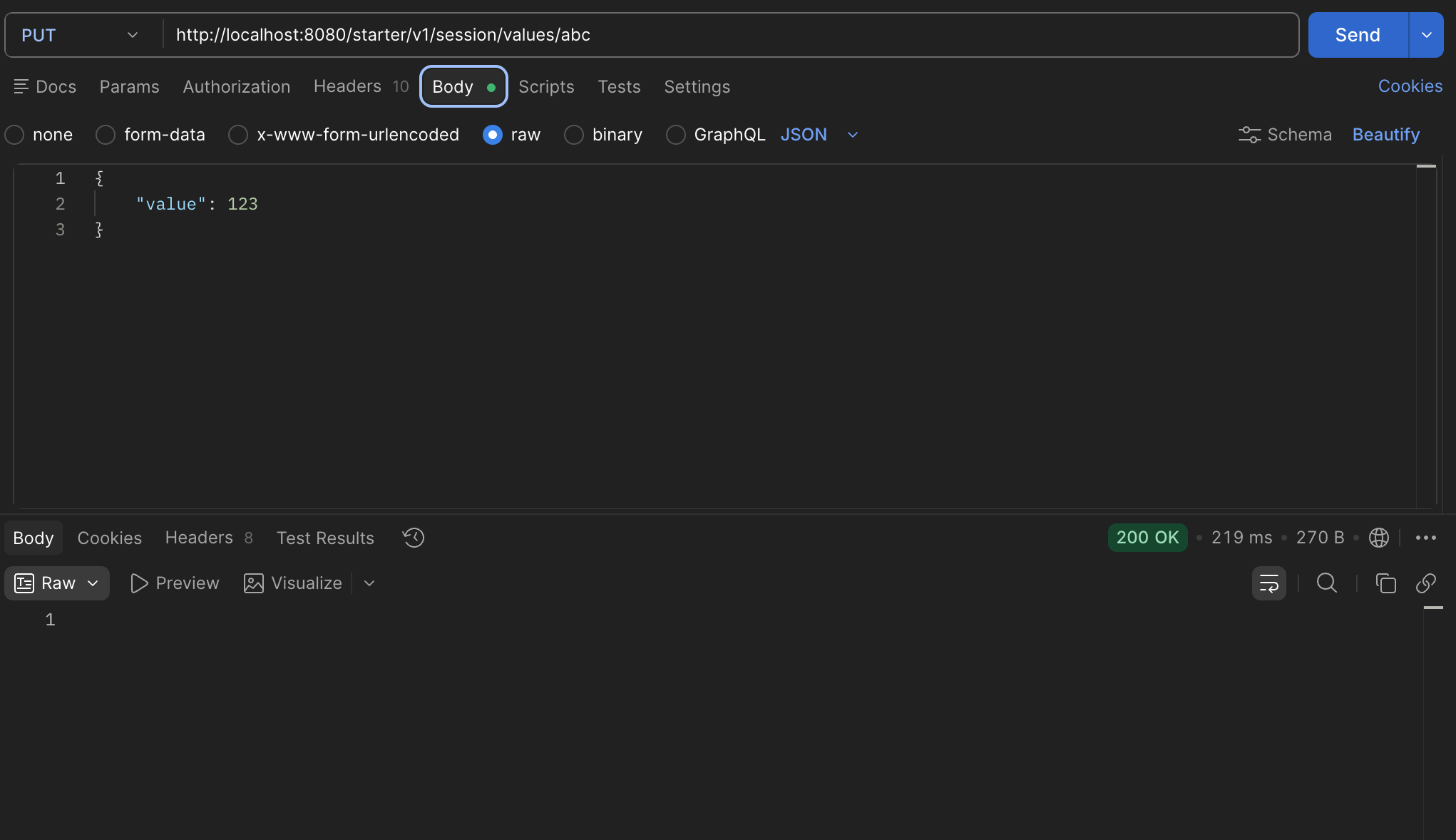
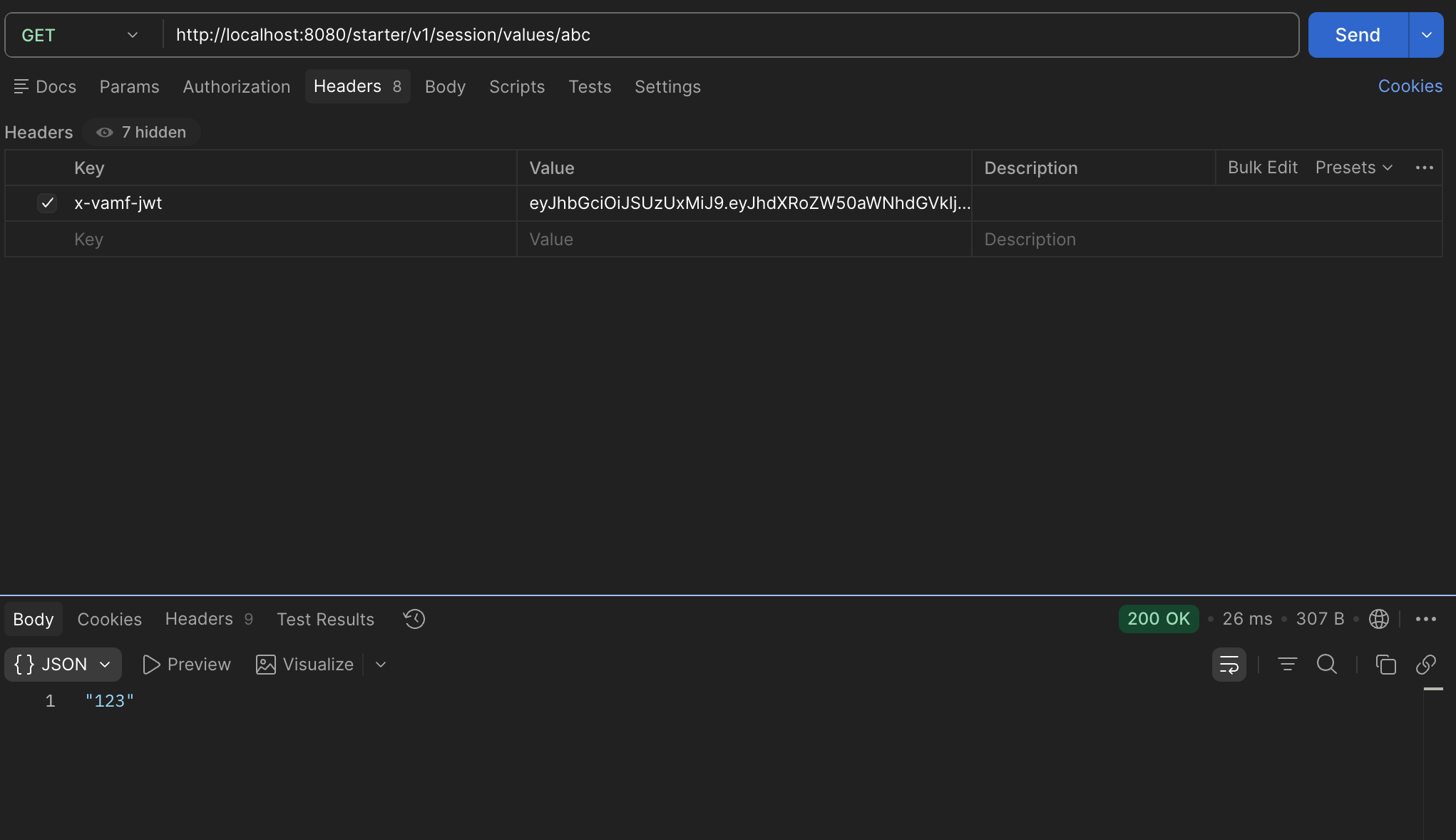
With this class in place we can start up our service using the skaffold dev command and make calls to both set and retrieve session variables. These calls are JWT protected in the user-session-service, hence the reason we pass the JWT to the SessionClient when making any calls to it. For PUT calls, make sure you add the request body (see screenshot).
If you execute a docker ps once startup completes, you would see all the services initialized as docker containers:
CONTAINER ID   IMAGE          COMMAND                  CREATED         STATUS         PORTS     NAMES
bc1225692869   cb94f7a4f456   "/docker-entrypoint.…"   6 minutes ago   Up 6 minutes             k8s_wiremock_wiremock-7b96f79bdf-j2h4z_starter-service-test_de092098-4342-404c-826b-318539b1278e_0
21db30f984e2   7cb68f548201   "java -javaagent:/ap…"   6 minutes ago   Up 6 minutes             k8s_starter-service_starter-service-v1-6b54dffcff-nvvsq_starter-service-test_bc982cb1-7500-45e1-b7c6-46254ba6aa3e_0
c34aff8a0b71   d34dc1f0cffd   "java -cp @/app/jib-…"   6 minutes ago   Up 6 minutes             k8s_user-session-service_user-session-service-v1-5dfff9c9d8-lnqd4_starter-service-test_cb1bce24-4ba3-4178-86cd-8f9afa41afa4_0
a0245f78f309   061e6c3fb2a2   "sh -c 'cp /init/dum…"   6 minutes ago   Up 6 minutes             k8s_redis-v7_redis-v7-8db5d5749-94s69_starter-service-test_8e0b7c83-ff40-433e-b472-ab447c8e5b46_0
Create Integration Tests For User Session Endpoints
At this point, you should create some integration tests for your UserSessionController.java class. Create your test class in the same test directory where your ServiceControllerITCase test file is located and name it UserSessionControllerITCase.java.
-
The example below contains successful PUT and GET tests, as well as a negative PUT test. Helper methods have been provided for making the Rest calls to the endpoints.
The example tests reference buildRestClient, the helper method you refactored from ServiceControllerITCase to BaseITCase earlier. If you have not done so, perform that refactoring now so it can be reused in this test class. -
Implement the additional negative case tests for the outlined scenarios.
package gov.va.mobile.starter.v1.service;

import gov.va.mobile.security.jwt.test.JwtTestUtils;
import gov.va.mobile.security.jwt.v2.JwtUserV2;
import gov.va.mobile.starter.v1.model.SetSessionValueRequest;
import org.assertj.core.api.Assertions;
import org.junit.jupiter.api.Test;
import org.springframework.http.HttpStatus;
import org.springframework.web.client.HttpClientErrorException;
import org.springframework.web.client.RestClient;

import java.util.Collections;

import static org.assertj.core.api.AssertionsForClassTypes.assertThat;
import static org.junit.jupiter.api.Assertions.assertThrows;

class UserSessionControllerITCase extends BaseITCase {

    final String testValue = "1234Test";
    final SetSessionValueRequest sessionValueRequest = new SetSessionValueRequest();

    UserSessionControllerITCase() {
        sessionValueRequest.setValue(testValue);
    }

    /**
     * Set and Get Key, 200.
     */
    @Test
    void testPutSessionValueAndGet() {
        final JwtUserV2 user = JwtTestUtils.V2
                .createStaffUserBuilder()
                .build();

        final RestClient restClient = buildRestClient(user);

        restPutSessionValue(restClient, "test", sessionValueRequest);

        final String val = restGetSessionValue(restClient, "test");
        assertThat(val).isEqualTo(testValue);
    }

    /**
     * Set Without Resource, 403.
     */
    @Test
    void testSetSessionWithJwtWithoutAuthorizedResources() {
        final JwtUserV2 user = JwtTestUtils.V2
                .createStaffUserBuilder()
                .authorizedResources(Collections.emptyList())
                .build();

        final RestClient restClient = buildRestClient(user);

        final HttpClientErrorException thrown = assertThrows(HttpClientErrorException.class, () -> restPutSessionValue(restClient, "test", sessionValueRequest));
        Assertions.assertThat(thrown.getStatusCode()).isEqualTo(HttpStatus.FORBIDDEN);
    }

    /**
     * Set Without Staff Role, 403.
     */
    @Test
    void testSetSessionWithJwtWithoutStaffRole() {
        //TODO: implement
    }

    /**
     * Set Key Without JWT, 401.
     */
    @Test
    void testSetSessionWithoutJwt() {
        //TODO: implement
    }

    /**
     * Get Without Resource, 403.
     */
    @Test
    void testGetSessionWithJwtWithoutAuthorizedResources() {
        //TODO: implement
    }

    /**
     * Get Key Without JWT, 401.
     */
    @Test
    void testGetSessionWithoutJwt() {
        //TODO: implement
    }

    /**
     * Set Key With Null Value, 400.
     */
    @Test
    void testSetSessionWithNullValue() {
        //TODO: implement
    }

    /**
     * NOTE: This test is a special case.
     * Get Key Not Found, 404.
     */
    @Test
    void testNotFoundKey() {
        //TODO: implement
    }

    private static String restGetSessionValue(final RestClient restClient, final String key) {
        return restClient.get()
                         .uri("/session/values/{key}", key)
                         .retrieve()
                         .toEntity(String.class)
                         .getBody();
    }

    private static void restPutSessionValue(final RestClient restClient, final String key, final SetSessionValueRequest sessionValueRequest) {
        restClient.put()
                  .uri("/session/values/{key}", key)
                  .body(sessionValueRequest)
                  .retrieve()
                  .toBodilessEntity();
    }
}
The integration test testNotFoundKey() has a note above it stating that it is a special case. Since your service does not have custom exception handling yet, a search for a non-existent key will result in a 500 Internal Server Error rather than a 404 Not Found Error. This behavior will change once you add exception handling, but for now, implement testNotFoundKey() to test for a 500 Internal Server Error.
|
Update JWTVerificationITCase With New Endpoint
One of the tests that was provided for you when you created your service is JWTVerificationITCase. This test provides basic JWT resource and/or role requirement testing for service endpoints. The provided implementation already accounts for resource testing of the endpoint in ServiceController. However, as implemented, it does not account for role testing.
-
Create new entries in the
jwtRestRequestshelper method for the/session/values/{key}GET and PUT mappings (thekeycan be any string) to verify they are resource protected.-
The commented out entry shows an example of specifying a different HTTP method (the default is GET).
-
-
Additionally, create a new parameterized test for role testing called
testJwtRoleRestrictions. Refer to the existingtestJwtRestrictionstest for an example of how to implement this for role testing instead of resource testing.-
The method signature should take in a JwtRestRequest and one or more String roles to verify.
-
Create
jwtRestRoleRequestshelper method to return testing arguments like injwtRestRequests, but including the role(s) for role testing. ThetestJwtRoleRestrictionstest should use this helper as a method source to verify that the/session/values/{key}PUT endpoint is restricted to Staff users only.
-
Add Service Health Checks to CommonServiceITCase
Your generated service also includes a test class called CommonServiceITCase, which includes a test called verifyHealthChecks. This test utilizes ActuatorAssertions from the mobile-boot-starter-webmvc-test library dependency included in your service, and it will verify a service’s availability through its /health Actuator endpoint. Your added dependencies for the Mobile MVI and User Session services are configured using Mobile Framework’s RestClientManager, which automatically configures their health endpoints. You can add them to this test class so that their availability can be considered as part of your service’s overall health.
-
Update the
verifyHealthCheckstest ofCommonServiceITCaseby uncommenting the.hasComponentsUp()directive and addingmobile-mvi-serviceanduser-session-serviceas included dependent services as part of the service health check.
If your service is currently running, run ./mvnw verify -Pskaffold-integration to verify that your new and modified tests execute successfully. Or, if your service is not running, execute a full build, including integration tests, with ./mvnw clean install -Pwith-skaffold. If you have any test failures, resolve those before moving on to the next section. If you have issues with your tests and need to debug, refer to the debug guide for instructions on setting up remote debugging with your IDE. If you have additional questions, please reach out to the onboarding team for assistance.