Modify The Service
Update the Swagger Contract with New Endpoints
Now that you have a successful build, let’s next look at how an update to the service’s swagger contract would be performed.
We design our services by creating the contract for our public endpoints first. This enables conversations with those who depend on our services earlier in the development process, as well as allowing a natural moment to consider the design warranted for each service.
The swagger contract in the starter-service (src/main/resources/swagger.json) needs to be updated to support two new endpoints:
-
PUT /session/vars/{key}
-
GET /session/vars/{key}
There are many ways to modify the swagger contract, including using any text editor, or Visual Studio Code/intelliJ with helpful extensions/plugins. If you have never worked with swagger documents before, the quickest way to gain an understanding may be to paste the existing contract into the swagger editor at https://swagger.io/tools/swagger-editor/. At https://swagger.io, you can learn more about the Swagger project and the Swagger/OpenAPI spec.
| When you first built your service, you may have noticed that an openapi.json file was generated in the resources directory alongside the swagger.json file. This file is generated from the swagger.json service contract to be used for endpoint cataloging only, and therefore should not be edited. The swagger contract defined in swagger.json is the source of truth for the service API definition and should be the only file edited when making changes to the service API. |
Here is what the swagger should look like after the two new endpoints are added to starter-service/src/main/resources/swagger.json:
{
  "openapi": "3.0.3",
  "info": {
    "version": "@starter-service-client.version@",
    "title": "starter-service"
  },
  "tags": [
    {
      "name": "Starter"
    }
  ],
  "security": [
    {
      "requireVamfJwtKey": []
    }
  ],
  "servers": [
    {
      "description": "SQA",
      "url": "https://staff.apps-staging.va.gov/starter/v1"
    },
    {
      "description": "PROD",
      "url": "https://staff.apps.va.gov/starter/v1"
    }
  ],
  "paths": {
    "/patients/{icn}/info": {
      "get": {
        "tags": [
          "Starter"
        ],
        "description": "Retrieves the patient information.",
        "operationId": "getPatientInfo",
        "parameters": [
          {
            "name": "icn",
            "in": "path",
            "description": "The identifier of the patient to retrieve info for.",
            "required": true,
            "schema": {
              "type": "string"
            }
          }
        ],
        "responses": {
          "200": {
            "description": "Successful response",
            "content": {
              "application/json": {
                "schema": {
                  "$ref": "#/components/schemas/PatientInfoResponse"
                }
              }
            }
          },
          "default": {
            "description": "Error payload"
          }
        }
      }
    },
    "/session/vars/{key}": {
      "summary": "Put and Get Session values.",
      "description": "These methods allows apps and services to PUT and GET session variables for this user. It will *not* accept requests from browsers (i.e. User-Agent       contains 'Mozilla') in order to prevent potential XSS threats.",
      "parameters": [
        {
          "name": "key",
          "in": "path",
          "description": "The identifier for the session.",
          "required": true,
          "schema": {
            "type": "string"
          }
        }
      ],
      "get": {
        "summary": "Get a session value for this user/session.",
        "description": "This method allows apps and services to retrieve session variables for this user. It will *not* accept requests from browsers (i.e. User-Agent       contains 'Mozilla') in order to prevent potential XSS threats.",
        "operationId": "getSessionVariable",
        "responses": {
          "200": {
            "description": "Key value pair was successfully set.",
            "content": {
              "application/json": {
                "schema": {
                  "type": "string"
                }
              }
            }
          },
          "401": {
            "description": "Token Required"
          },
          "403": {
            "description": "Not Allowed"
          },
          "404": {
            "description": "Not Found"
          }
        },
        "tags": [
          "Session"
        ]
      },
      "put": {
        "summary": "Set a key/value pair for this user/session.",
        "description": "This method allows apps and services set session variables for this user. It will *not* accept requests from browsers (i.e. User-Agent contains 'Mozilla') in order to prevent potential XSS threats.",
        "operationId": "setSessionVariable",
        "requestBody": {
          "content": {
            "application/json": {
              "schema": {
                "type": "object",
                "properties": {
                  "value": {
                    "description": "Value for the key",
                    "type": "string"
                  }
                }
              }
            }
          }
        },
        "responses": {
          "202": {
            "description": "Key value pair was successfully set."
          },
          "401": {
            "description": "Token Required"
          },
          "403": {
            "description": "Not Allowed"
          },
          "404": {
            "description": "Not Found"
          }
        },
        "tags": [
          "Session"
        ]
      }
    }
  },
  "components": {
    "securitySchemes": {
      "requireVamfJwtKey": {
        "type": "apiKey",
        "in": "header",
        "name": "X-VAMF-JWT"
      }
    },
    "schemas": {
      "PatientInfo": {
        "type": "object",
        "required": [
          "icn"
        ],
        "properties": {
          "icn": {
            "type": "string",
            "description": "Patient ICN identifier"
          },
          "firstName": {
            "type": "string",
            "description": "Patient first name"
          },
          "lastName": {
            "type": "string",
            "description": "Patient last name"
          },
          "dateOfBirth": {
            "type": "string",
            "description": "Patient date of birth"
          }
        }
      },
      "ErrorResponse": {
        "type": "object",
        "required": [
          "errors"
        ],
        "properties": {
          "status": {
            "type": "integer",
            "description": "Overall Error status"
          },
          "errors": {
            "$ref": "#/components/schemas/Error"
          }
        }
      },
      "Error": {
        "type": "object",
        "required": [
          "status",
          "code"
        ],
        "properties": {
          "status": {
            "type": "integer",
            "description": "Error status"
          },
          "code": {
            "type": "string",
            "description": "Error code"
          },
          "detail": {
            "type": "string",
            "description": "Error detail"
          }
        }
      },
      "PatientInfoResponse": {
        "type": "object",
        "required": [
          "data"
        ],
        "properties": {
          "data": {
            "$ref": "#/components/schemas/PatientInfo"
          }
        }
      }
    }
  }
}
At this point the project could be rebuilt, but we haven’t yet placed an actual resource behind our newly created endpoints. When you rebuild the service, the client package will parse the swagger contract and generate the API client and domain model objects. However, if the new endpoints were accessed, the result at this time would just be a 404 error.
Create a Resource for the New Endpoints
Under package gov.va.mobile.starter.v1.service.resource, create a new class named UserSessionResource. Implement mappings for both the GET and the PUT endpoints we just added to the swagger contract. For now, it can just return an empty response, and we will return to an implementation later on in the project tutorial.
The implementation class should look roughly like this:
package gov.va.mobile.starter.v1.service.resource;

import org.springframework.http.HttpStatus;
import org.springframework.http.ResponseEntity;
import org.springframework.web.bind.annotation.GetMapping;
import org.springframework.web.bind.annotation.PathVariable;
import org.springframework.web.bind.annotation.PutMapping;
import org.springframework.web.bind.annotation.RequestMapping;
import org.springframework.web.bind.annotation.RestController;

@RestController
@RequestMapping(path = "/session/vars/{key}")
public class UserSessionResource {

    @GetMapping
    public ResponseEntity<String> getSessionVar(final @PathVariable String key) {

        //stubbed out for now
        return new ResponseEntity<>(HttpStatus.OK);
    }

    @PutMapping
    public ResponseEntity<String> putSessionVar(final @PathVariable String key) {

        //stubbed out for now
        return new ResponseEntity<>(HttpStatus.OK);
    }
}
Now we can run the service with the skaffold dev command and hit the new endpoints. The response will be empty with a 200 OK status.
Integrating With Another Service
The starter-service’s example route of patients/{icn}/info is documented to return information about a user for the provided ICN (a type of identifier). However, it is not returning the correct information; it is instead returning the information about the logged-in user. In order to retrieve the correct information, we need to integrate the mobile-mvi-service as a dependency in our service. Since this service contacts the VA’s master veteran index (MVI) service, we will need to mock out a response from this service using wiremock.
To add mobile-mvi-service to your project, you’ll need to make the following modifications:
-
Add the
mobile-mvi-servicedependency, as well as thewiremockandredisdependencies needed by it, to the service’s kubernetes configuration -
Add the versions of
mobile-mvi-service-clientandmobile-mvi-service-test-utilsas build properties in the service’s pom.xml -
Add
mobile-service-rest-client-starterandmobile-mvi-service-clientas provided dependencies to pom.xml -
Add
mobile-mvi-service-test-utilsandwiremockas test dependencies to pom.xml -
Add the
MOBILE_MVI_SVC_URLproperty to the service’s base application.env -
Update the AppProperties.java and application.properties files to make the
MOBILE_MVI_SVC_URLproperty available to the service -
Add a port forward for wiremock to skaffold.yaml
-
Update AppPropertiesTest.java to account for the new property
-
Add the
mobile-mvi-servicedependency to the list of dependencies in the README.md
Let’s start by adding mobile-mvi-service, wiremock and redis as service dependencies in the kubernetes/dev-with-depedencies/kustomization.yaml file. Order matters, so place the wiremock dependency first:
apiVersion: kustomize.config.k8s.io/v1beta1
kind: Kustomization

resources:
- https://coderepo.mobilehealth.va.gov/scm/ckm/common-app-config.git//dev?ref=main


components:
- https://coderepo.mobilehealth.va.gov/scm/ckm/wiremock.git//kubernetes?ref=Release/3.13.0&timeout=60s
- https://coderepo.mobilehealth.va.gov/scm/iums/mobile-mvi-service.git//kubernetes/components/dev?ref=Release/1.41&timeout=60s
- https://coderepo.mobilehealth.va.gov/scm/dhsss/redis.git//kubernetes?ref=v7.0.15&timeout=60s
- ../components/dev
This will pull the dependencies from their git repositories and configure them for use with skaffold and kustomize.
Next, add the following properties and dependencies to starter-service’s pom.xml in the appropriate sections:
<properties>
...
    <mobile-mvi-service-client.version>1.41</mobile-mvi-service-client.version>
    <mobile-mvi-service-test-utils.version>1.41.2</mobile-mvi-service-test-utils.version>
...
</properties>

<dependencies>
...
    <!-- Starters -->
    <dependency>
      <groupId>gov.va.mobile.lib</groupId>
      <artifactId>mobile-service-rest-client-starter</artifactId>
    </dependency>
...
    <!-- Clients -->
    <dependency>
        <groupId>gov.va.mobile.client.openapi</groupId>
        <artifactId>mobile-mvi-client</artifactId>
        <version>${mobile-mvi-service-client.version}</version>
    </dependency>
...
    <!-- Test Dependencies -->
    <dependency>
      <groupId>gov.va.mobile.lib</groupId>
      <artifactId>mobile-mvi-service-test-utils</artifactId>
      <version>${mobile-mvi-service-test-utils.version}</version>
      <scope>test</scope>
    </dependency>
    <dependency>
      <groupId>org.wiremock</groupId>
      <artifactId>wiremock</artifactId>
      <scope>test</scope>
    </dependency>
...
</dependencies>
Add the following line to kubernetes/base/application.env:
MOBILE_MVI_SVC_URL=http://mobile-mvi-service-v1:8080/mvi/v1Add the following property to starter-service/src/main/resources/application.properties:
mobile.starter.mobile-mvi-svc-url=${MOBILE_MVI_SVC_URL:http://mobile-mvi-service-v1:8080/mvi/v1}In addition, update AppProperties.java to expose the MOBILE_MVI_SVC_URL property added above:
...
public class AppProperties {
...

  @NotEmpty
  private String mobileMviSvcUrl;
...
}
Lastly, add a port forward for wiremock to skaffold.yaml in order for it to be available to our integration tests:
...
portForward:
- resourceType: service
  resourceName: starter-service-v1
  port: 8080
- resourceType: deployment
  resourceName: starter-service-v1
  port: 8081
- resourceType: deployment
  resourceName: starter-service-v1
  port: 6300
- resourceType: service
  resourceName: wiremock
  port: 8080
  localPort: 8084
...
That’s all the configuration changes needed to add the mobile-mvi-service dependency. However, if you tried to run the service at this point, your build would fail during the unit test phase. Why? One of the test classes that comes with your generated service is AppPropertiesTest, which checks that your property values are properly configured. Since you added a new required property for Mobile MVI’s service URL, you will need to update the verifyRequiredProperties_Valid() test method to account for the additional property:
...
    @Test
    void verifyRequiredProperties_Valid() {
        contextRunner.withPropertyValues("mobile.starter.test-property=test",
                        "mobile.starter.example-service-url=url",
                        "mobile.starter.mobile-mvi-svc-url=url")
                .run(context -> assertThatNoException().isThrownBy(() -> context.getBean(AppProperties.class)));
    }
...
Technically, the tests verifyRequiredProperties_Missing() and verifyRequiredProperties_Empty() are also now incorrect, although they will not fail on execution. However, you should take this opportunity to update them appropriately so that they are correctly checking for your new property.
|
With the test updated, if you run the service at this point using skaffold dev, you would see all the services initialized as docker containers once all the startup completes by executing a docker ps:
CONTAINER ID   IMAGE          COMMAND                  CREATED          STATUS          PORTS     NAMES
ee8adb88c7fe   cb94f7a4f456   "/docker-entrypoint.…"   39 seconds ago   Up 38 seconds             k8s_wiremock_wiremock-7459bc54dc-k2n5d_starter-service-test_6e207ac7-f3b9-443c-9737-f086448ea5f8_0
ab3a2130a37f   6e9805aff57e   "java -javaagent:/ap…"   39 seconds ago   Up 38 seconds             k8s_starter-service_starter-service-v1-6bd7fb5b7-m6d45_starter-service-test_5915f353-8991-4be1-bbaf-e224862aa207_0
04fb4f682150   061e6c3fb2a2   "sh -c 'cp /init/dum…"   39 seconds ago   Up 38 seconds             k8s_redis-v7_redis-v7-7b9ff77775-wrh67_starter-service-test_31c4c782-da44-4dd2-9708-85783e7a438a_0
9f22c001d8d5   f7fafed21696   "java -cp @/app/jib-…"   39 seconds ago   Up 38 seconds             k8s_mobile-mvi-service_mobile-mvi-service-v1-5dc4559c8d-wn2ng_starter-service-test_ef8d352e-a30f-445a-81a7-76ee920120ca_0
Modify the Patient Info Endpoint
Now that the new dependencies are available, we can get details about a patient via their ICN number from the mobile-mvi-service client instead of reading it from the logged-in user JWT. To do this, call the MviApi.getVeteranDemographics() method to get a Person object, and then set the returned data on the PatientInfo instance.
Update the method getInfo in ServiceResource.java to resemble the code below. Note the added constructor to set up the MviApi with the proper base path. Ensure that the ApiClient used in the constructor is the version from the newly added MVI dependency:
package gov.va.mobile.starter.v1.service.resource;

import gov.va.mobile.starter.v1.model.PatientInfo;
import gov.va.mobile.starter.v1.model.PatientInfoResponse;
import gov.va.mobile.service.security.HeaderNames;
import gov.va.mobile.service.security.web.jwt.JWTRestricted;
import gov.va.mobile.starter.v1.service.AppProperties;
import gov.va.mobile.mvi.v1.client.restclient.ApiClient;
import gov.va.mobile.mvi.v1.client.restclient.api.MviApi;
import gov.va.mobile.mvi.v1.model.Person;
import org.springframework.http.MediaType;
import org.springframework.web.bind.annotation.GetMapping;
import org.springframework.web.bind.annotation.PathVariable;
import org.springframework.web.bind.annotation.RequestHeader;
import org.springframework.web.bind.annotation.RequestMapping;
import org.springframework.web.bind.annotation.RestController;
import org.springframework.web.client.RestClient;

/**
 * REST endpoint that allows clients to retrieve Patient Information.
 *
 * @since 1.0
 */
@RestController
@JWTRestricted(checkResource = true)
@RequestMapping(path = "/patients/{icn}")
public class ServiceResource {

  private final MviApi mviApi;

  public ServiceResource(final AppProperties config, final RestClient.Builder restClientBuilder) {
    ApiClient apiClient = new ApiClient(restClientBuilder.build());
    apiClient.setBasePath(config.getMobileMviSvcUrl());
    mviApi = new MviApi(apiClient);
  }

  /**
   * Returns the Patient Information {@link PatientInfoResponse} associated with the provided ICN Identifier.
   *
   * @param icn
   *         the ICN Identifier used to retrieve the {@link PatientInfoResponse}
   * @param jwt
   *         the JWT header value
   *
   * @return ResponseEntity wrapped with PatientInfoResponse {@link PatientInfoResponse}
   *
   * @see PatientInfoResponse
   */
  @GetMapping(value = "/info", produces = MediaType.APPLICATION_JSON_VALUE)
  public PatientInfoResponse getInfo(@PathVariable("icn") final String icn,
                                     @RequestHeader(HeaderNames.VAMF_JWT_HEADER) final String jwt) {

    mviApi.getApiClient().setApiKey(jwt);
    Person person = mviApi.getVeteranDemographics("ICN", icn, null, false, null);

    final PatientInfo info = new PatientInfo();
    info.setFirstName(person.getFirstName());
    info.setLastName(person.getLastName());
    info.setDateOfBirth(person.getBirthTime());
    info.setIcn(icn);
    final PatientInfoResponse response = new PatientInfoResponse();
    response.setData(info);
    return response;
  }
}
Load the Mock MVI Data for Testing
Because we need to mock a response from mobile-mvi-service in order to test this code, we need to load some mock MVI data into our wiremock registry.
Create the directory src/test/resources/mocks/mvi and copy the following request and response mock files there.
To load the mock data and make it available for testing, update BaseITCase.java in the following way. We will use a helper from the mobile-mvi-service-test-utils dependency added earlier to set up our data:
package gov.va.mobile.starter.v1.service;

import com.github.tomakehurst.wiremock.client.WireMock;
import gov.va.mobile.tools.skaffold.annotations.ServiceHost;
import gov.va.mobile.tools.skaffold.annotations.ServicePort;
import gov.va.mobile.tools.skaffold.annotations.ServiceUrl;
import gov.va.vamf.mvi.util.MviWireMockUtils;
import lombok.extern.slf4j.Slf4j;
import org.junit.jupiter.api.BeforeAll;

/**
 * Base Class for the starter-service Integration Test Cases.
 *
 * @since 1.0
 */
@Slf4j
public abstract class BaseITCase {

  protected static final String VET_ICN = "100031V310296";
  protected static final String STAFF_ICN = "123";

  @ServiceUrl(name = "starter-service-v1", basePath = "/starter/v1")
  protected static String SERVICE_URL;

  @ServiceHost("wiremock")
  static String WIREMOCK_SERVICE_HOST;

  @ServicePort(name = "wiremock")
  static Integer WIREMOCK_SERVICE_PORT;

  @BeforeAll
  public static void init() throws Exception {
    final WireMock wireMock = new WireMock(WIREMOCK_SERVICE_HOST, WIREMOCK_SERVICE_PORT);

    setupMviMocks(wireMock);
  }

  private static void setupMviMocks(WireMock wireMock) throws Exception {

    final String mockDir = "src/test/resources/mocks/mvi";

    MviWireMockUtils.setupMviMock_1305(wireMock,
            mockDir + "/request.xml",
            mockDir + "/response.xml");
  }
}
Modify Tests for Patient Info Endpoint
Since you have updated the code in ServiceResource.java, the example test in ServiceResourceITCase.java is now incorrect and needs to be updated. Below is an example implementation of the getPatientInfo test for a staff user.
package gov.va.mobile.starter.v1.service.resource;

import gov.va.mobile.service.security.UserRoles;
import gov.va.mobile.service.security.jwt.v2.JWTUserV2;
import gov.va.mobile.service.test.JWTTestUtils;
import gov.va.mobile.starter.v1.client.restclient.ApiClient;
import gov.va.mobile.starter.v1.client.restclient.api.StarterApi;
import gov.va.mobile.starter.v1.model.PatientInfoResponse;
import gov.va.mobile.starter.v1.service.BaseITCase;
import org.junit.jupiter.api.Test;
import org.springframework.http.HttpStatus;
import org.springframework.web.client.HttpClientErrorException;

import java.util.Collections;
import java.util.List;

import static org.assertj.core.api.Assertions.assertThat;
import static org.junit.jupiter.api.Assertions.assertThrows;

/**
 * Integration Test cases for the {@code "/patients/{icn}/info"} REST endpoint.
 *
 * @since 1.0
 */
class ServiceResourceITCase extends BaseITCase {

  /**
   * 200 response - Staff is able to get patient data
   */
  @Test
  void testGetPatientInfoAsStaff() {
    JWTUserV2 user =
            JWTUserV2.builder()
                    .authenticated(true)
                    .authorizedResources(Collections.singletonList(".*patients.*"))
                    .authorizedRoles(List.of(UserRoles.STAFF))
                    .subject(STAFF_ICN)
                    .build();
    final StarterApi api = getApi(user);

    final PatientInfoResponse response = api.getPatientInfo(VET_ICN);
    assertThat(response).isNotNull();
    assertThat(response.getData()).isNotNull();
    assertThat(response.getData().getFirstName()).isEqualTo("Jimmy Joe");
    assertThat(response.getData().getLastName()).isEqualTo("Rivers");
  }


  /**
   * 200 response - Patient is able to get self data
   */
  @Test
  public void testGetPatientInfoAsPatient() {
    //TODO: implement
  }

  /**
   * 401 response - no JWT is present
   */
  @Test
  public void testFailWithoutJWT() {
    //TODO: implement
  }

  /**
   * 403 response - no permissions
   */
  @Test
  public void testFailWithNoPermissions() {
    //TODO: implement
  }

  private static StarterApi getApi(final JWTUserV2 user) {
    final ApiClient apiClient = new ApiClient();
    apiClient.setBasePath(SERVICE_URL);
    apiClient.setApiKey(JWTTestUtils.generateJWT(user));
    return new StarterApi(apiClient);
  }
}-
Additional Exercise: write the tests for a patient (veteran) user, no JWT and no permissions (roles and/or resources) outlined above.
Because the /patients/{icn}/info endpoint is mocked, if you bring up your service and try to hit this endpoint in Postman or via curl, you will receive a 500 error, because the mocks are only initialized during the integration test phase. However,you can run your integration tests manually in your IDE and set breakpoints to inject your own values for testing.
|
Testing Ideals
Our testing philosophy combines unit and integration testing to verify the amount of coverage we have around our endpoints. When considered holistically like this, we are able to value test coverage as a meaningful metric regarding the state of our services. Therefore, we attempt to use real services as much as possible, using mocks only when necessary, and often only when retrieving data from external systems, as is the case in our starter-service. Unit tests are secondary to integration tests, and are usually only needed for code that is difficult to cover in integration tests.
Jacoco Coverage Report
To help you visualize your test coverage, you can generate the Jacoco coverage report by executing a full maven build with the verify or install goals:
mvn clean verify -Pwith-skaffold
or
mvn clean install -Pwith-skaffold
This will generate a report at target/site/jacoco/index.html that you can open in a browser to see the coverage details.
Implement The New User Session Endpoints
Next, we return to the two stubbed-out endpoints we created earlier in UserSessionResource.java.
-
The PUT endpoint should use
user-session-serviceand its generated client to save a sanitized user input (key/value pair) into a session variable. This endpoint should be restricted to only Staff users. The term we use for this type of access control is RBAC (Role-Based Access Control). -
The GET endpoint should return the session value for the requested key, and should be restricted to only those who have permission to access that specific endpoint. The term we use for this is Resource-Based Access Control. Though the acronym RBAC is suitable for each, this type of control is simplified just as “resource” control.
In order to add user-session-service to your project, the following steps will need to be taken. Note that we are following a similar process to adding in the mobile-mvi-service from earlier.
-
Add
session-service-client.versionas a build property andsession-service-clientas a client dependency to the pom.xml. -
Add the
user-session-servicedependency to the service’s kubernetes configuration. -
Add the required property and configuration for
USR_SVC_URLmuch like we did for the Mobile MVI URL property. -
Add the user-session-service dependency to the list of dependencies in the README.md
Following the steps above, add the following to the pom.xml file in the appropriate sections:
<properties>
...
  <session-service-client.version>1.27</session-service-client.version>
...
</properties>

<dependencies>
...
<dependency>
  <groupId>gov.va.mobile.client.openapi</groupId>
  <artifactId>session-service-client</artifactId>
  <version>${session-service-client.version}</version>
</dependency>
...
</dependencies>
Add the following to the kubernetes/dev-with-dependencies/kustomization.yaml file in the appropriate section:
...
components:
- https://coderepo.mobilehealth.va.gov/scm/iums/user-session-service.git//kubernetes/components/dev?ref=Release/1.27&timeout=60s
...
Lastly, perform these updates in a manner similar to how it was done for the Mobile MVI property:
-
Add
USER_SVC_URL=http://user-session-service-v1:8080/session/v1tokubernetes/base/application.env -
Add the property
userSessionSvcUrlto AppProperties.java -
Map the property to
USER_SVC_URLin application.propertiesMake sure to note the difference between the environment variable name and the property name. -
Update AppPropertiesTest to account for the new property
Next, we need to update our stubbed out methods from earlier in the UserSessionResource class. There are a few things we are adding so that our API for user-session-service is ready to go:
-
Declare a SessionApi instance, which is the session-service-client we added to our pom earlier
-
Add a constructor that sets up the SessionApi with the proper base path using the correct ApiClient.
-
Add the
x-vamf-jwtrequest header as a method parameter for thegetSessionVarandputSessionVarmethods. -
Add the request body as a method argument for
putSessionVar. The class we’ll use to do this isSetSessionVariableRequest, which is generated from the swagger contract and is in our client model. -
In the methods, we will set the JWT of the caller before actually making the API calls to our services.
-
To enforce the access control criteria stated earlier, we’ll add the
JWTRestrictedannotation to the class (since the endpoint is the same for both PUT and GET) for resource restriction, and we’ll add an additional "Staff" role restriction on theputSessionVarmethod in order to further restrict access to Staff users only.
Here is what your UserSessionResource class should look like:
package gov.va.mobile.starter.v1.service.resource;

import gov.va.mobile.service.security.HeaderNames;
import gov.va.mobile.service.security.UserRoles;
import gov.va.mobile.service.security.web.jwt.JWTRestricted;
import gov.va.mobile.starter.v1.model.SetSessionVariableRequest;
import gov.va.mobile.starter.v1.service.AppProperties;
import gov.va.mobile.session.v1.client.restclient.ApiClient;
import gov.va.mobile.session.v1.client.restclient.api.SessionApi;
import org.springframework.http.HttpStatus;
import org.springframework.http.MediaType;
import org.springframework.http.ResponseEntity;
import org.springframework.web.bind.annotation.GetMapping;
import org.springframework.web.bind.annotation.PathVariable;
import org.springframework.web.bind.annotation.PutMapping;
import org.springframework.web.bind.annotation.RequestBody;
import org.springframework.web.bind.annotation.RequestHeader;
import org.springframework.web.bind.annotation.RequestMapping;
import org.springframework.web.bind.annotation.RestController;
import org.springframework.web.client.RestClient;

@RestController
@JWTRestricted(checkResource = true)
@RequestMapping(path = "/session/vars/{key}")
public class UserSessionResource {

  private final SessionApi sessionApi;

  public UserSessionResource(final AppProperties config, final RestClient.Builder restClientBuilder) {
        ApiClient apiClient = new ApiClient(restClientBuilder.build());
        apiClient.setBasePath(config.getUserSessionSvcUrl());
        sessionApi = new SessionApi(apiClient);
    }

  /**
   * Get Session value that matches the key
   * @param key Key to be matched
   * @return Value from given key
   */
  @GetMapping(produces = MediaType.APPLICATION_JSON_VALUE)
  public ResponseEntity getSessionVar(@PathVariable final String key,
                                      @RequestHeader(HeaderNames.VAMF_JWT_HEADER) final String jwt) {
    sessionApi.getApiClient().setApiKey(jwt);
    String value = sessionApi.getSessionValue(key);
    //wrap the plain text value in quotes so it's a simple json value
    return ResponseEntity.status(HttpStatus.OK).body("\"" + value + "\"");
  }

  /**
   * Sets a Session value given a key and a JSON Value Object
   * @param key Key to be used for the Session. Sets the index to the value
   * @see SetSessionVariableRequest JSON object contains the value to be set for the Session
   * @return nothing
   */
  @PutMapping
  @JWTRestricted(roles = UserRoles.STAFF, checkResource = true)
  public ResponseEntity putSessionVar(@PathVariable final String key,
                                      @RequestBody final SetSessionVariableRequest body,
                                      @RequestHeader(HeaderNames.VAMF_JWT_HEADER) final String jwt) {
    sessionApi.getApiClient().setApiKey(jwt);
    sessionApi.setSessionValue(key, body.getValue());
    return ResponseEntity.status(HttpStatus.OK).build();
  }
}
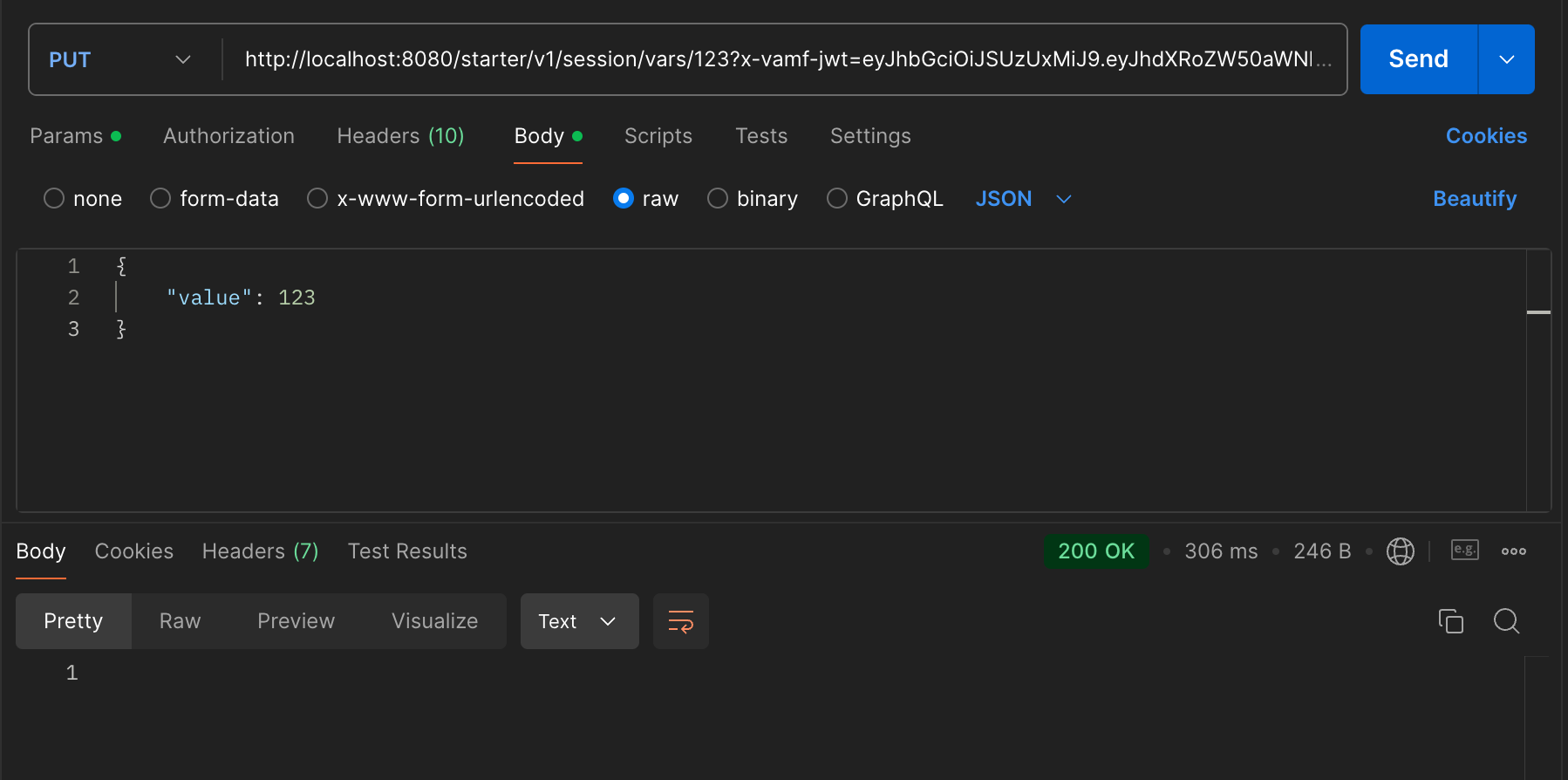
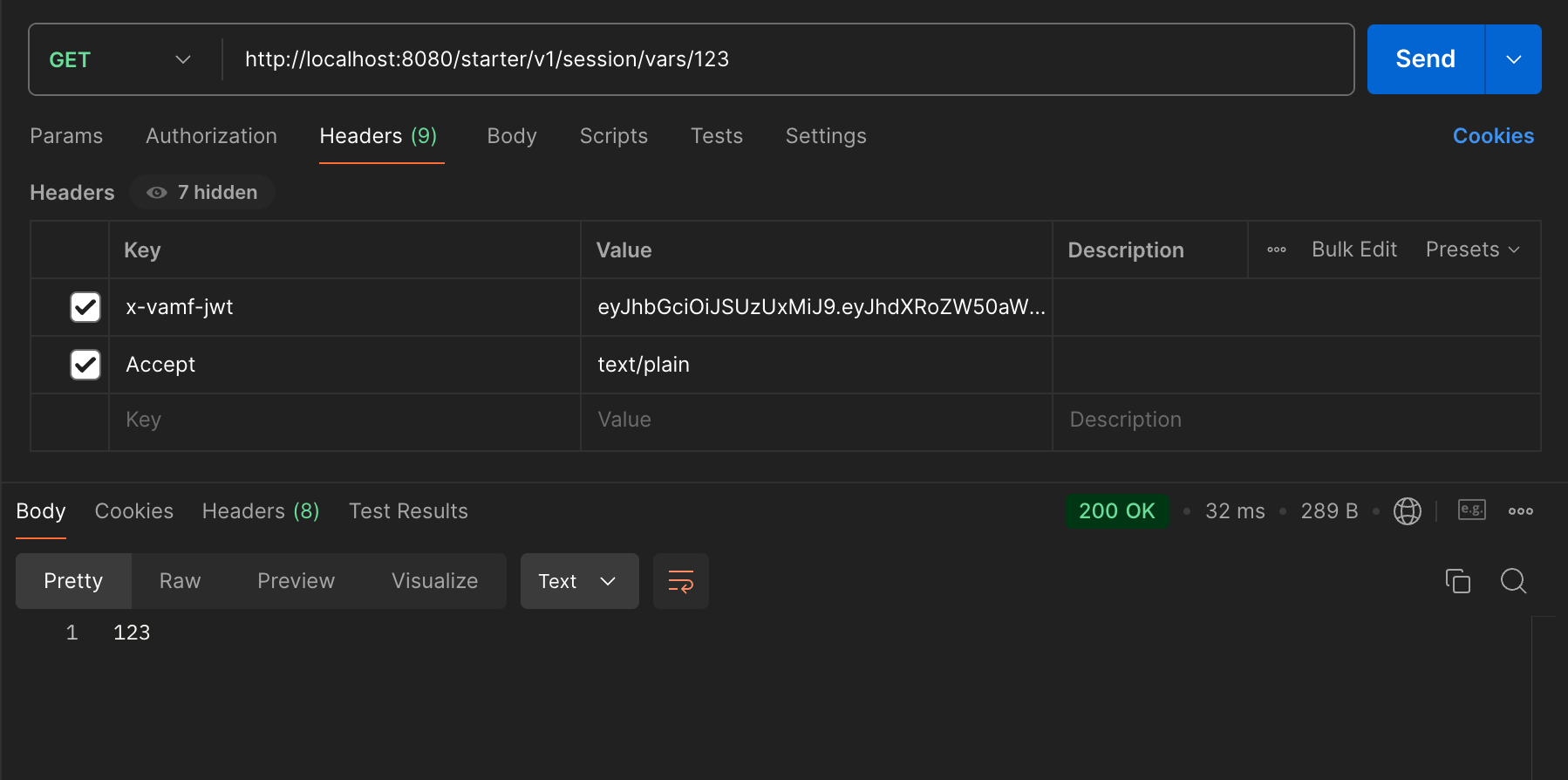
With this class in place we can start up our service using the skaffold dev command and make calls to both set and retrieve session variables. These calls are JWT protected in the user-session-service, hence the reason we add the JWT to the ApiClient before making any calls to it. For PUT calls, make sure you add the request body (see screenshot).
If you execute a docker ps once startup completes, you would see all the services initialized as docker containers:
CONTAINER ID   IMAGE          COMMAND                  CREATED         STATUS         PORTS     NAMES
bc1225692869   cb94f7a4f456   "/docker-entrypoint.…"   6 minutes ago   Up 6 minutes             k8s_wiremock_wiremock-7b96f79bdf-j2h4z_starter-service-test_de092098-4342-404c-826b-318539b1278e_0
21db30f984e2   7cb68f548201   "java -javaagent:/ap…"   6 minutes ago   Up 6 minutes             k8s_starter-service_starter-service-v1-6b54dffcff-nvvsq_starter-service-test_bc982cb1-7500-45e1-b7c6-46254ba6aa3e_0
c34aff8a0b71   d34dc1f0cffd   "java -cp @/app/jib-…"   6 minutes ago   Up 6 minutes             k8s_user-session-service_user-session-service-v1-5dfff9c9d8-lnqd4_starter-service-test_cb1bce24-4ba3-4178-86cd-8f9afa41afa4_0
a0245f78f309   061e6c3fb2a2   "sh -c 'cp /init/dum…"   6 minutes ago   Up 6 minutes             k8s_redis-v7_redis-v7-8db5d5749-94s69_starter-service-test_8e0b7c83-ff40-433e-b472-ab447c8e5b46_0
1c8e3e0dd270   c5047e5a62c9   "java -cp @/app/jib-…"   6 minutes ago   Up 6 minutes             k8s_mobile-mvi-service_mobile-mvi-service-v1-5f4f7fbc89-zcwgm_starter-service-test_2aa979b2-b33a-4f64-b722-6370b51b2b0f_0
Create Integration Tests For User Session Endpoints
At this point, you should create some integration tests for your UserSessionResource.java class. Create your test class in the same test resource directory that you created earlier and name it UserSessionResourceITCase.java.
-
The example below contains successful PUT and GET tests, as well as a negative PUT test.
-
Implement the additional negative case tests for the outlined scenarios.
package gov.va.mobile.starter.v1.service.resource;

import gov.va.mobile.service.security.UserRoles;
import gov.va.mobile.service.security.jwt.v2.JWTUserV2;
import gov.va.mobile.service.test.JWTTestUtils;
import gov.va.mobile.starter.v1.client.restclient.ApiClient;
import gov.va.mobile.starter.v1.client.restclient.api.SessionApi;
import gov.va.mobile.starter.v1.model.SetSessionVariableRequest;
import gov.va.mobile.starter.v1.service.BaseITCase;
import org.assertj.core.api.Assertions;
import org.junit.jupiter.api.Test;
import org.springframework.http.HttpStatus;
import org.springframework.web.client.HttpClientErrorException;

import java.util.Collections;
import java.util.List;

import static org.assertj.core.api.AssertionsForClassTypes.assertThat;
import static org.junit.jupiter.api.Assertions.assertThrows;

public class UserSessionResourceITCase extends BaseITCase {

  final String testValue = "1234Test";
  final SetSessionVariableRequest sessionVariableRequest = new SetSessionVariableRequest();

  UserSessionResourceITCase() {
    sessionVariableRequest.setValue(testValue);
  }

  /**
   * Set and Get Key, 200
   */
  @Test
  void testPutSessionVariableAndGet()  {
    JWTUserV2 user =
            JWTUserV2.builder()
                    .authenticated(true)
                    .authorizedResources(Collections.singletonList(".*/session/var.*"))
                    .authorizedRoles(List.of(UserRoles.STAFF, UserRoles.VETERAN))
                    .subject(VET_ICN)
                    .build();
    SessionApi sessionApi = getApi(user);
    sessionApi.setSessionVariable("test", sessionVariableRequest);

    String val = sessionApi.getSessionVariable("test");
    assertThat(val).isEqualTo(testValue);
  }

  /**
   * Set Without Resource, 403
   */
  @Test
  void testSetSessionWithJwtWithoutAuthorizedResources() {
    JWTUserV2 user =
            JWTUserV2.builder()
                    .authenticated(true)
                    .authorizedRoles(List.of(UserRoles.STAFF, UserRoles.VETERAN))
                    .subject(VET_ICN)
                    .build();
    SessionApi sessionApi = getApi(user);
    HttpClientErrorException thrown = assertThrows(HttpClientErrorException.class, () -> sessionApi.setSessionVariable("test", sessionVariableRequest));
    Assertions.assertThat(thrown.getStatusCode()).isEqualTo(HttpStatus.FORBIDDEN);
  }

  /**
   * Set Without Staff Role, 403
   */
  @Test
  void testSetSessionWithJwtWithoutStaffRole() {
    //TODO: implement
  }
  /**
   * Set Key Without JWT, 401
   */
  @Test
  void testSetSessionWithoutJwt() {
    //TODO: implement
  }

  /**
   * Get Without Resource, 403
   */
  @Test
  void testGetSessionWithJwtWithoutAuthorizedResources() {
    //TODO: implement
  }

  /**
   * Get Key Without JWT, 401
   */
  @Test
  void testGetSessionWithoutJwt() {
    //TODO: implement
  }

  /**
   * NOTE: This test is a special case
   * Get Key Not Found, 404
   */
  @Test
  void testNotFoundKey()  {
    //TODO: implement
  }

  private SessionApi getApi(final JWTUserV2 user) {
    final ApiClient apiClient = new ApiClient();
    apiClient.setBasePath(SERVICE_URL);
    apiClient.setApiKey(JWTTestUtils.generateJWT(user));
    return new SessionApi(apiClient);
  }
}
The integration test testNotFoundKey() has a note above it stating that it is a special case. Since your service does not have custom exception handling yet, a search for a non-existent key will result in a 500 Internal Server Error rather than a 404 Not Found Error. This behavior will change once you add exception handling, but for now, implement testNotFoundKey() to test for a 500 Internal Server Error.
|
Update JWTVerificationITCase With New Endpoint
One of the tests that was provided for you when you created your service is JWTVerificationITCase. This test provides basic JWT resource and/or role requirement testing for service endpoints. The provided implementation already accounts for resource testing of the endpoint in ServiceResource. Create new entries in the getJWTAuthResourcesRequiredUrls test for the /session/vars/{key} GET and PUT mappings (the key can be any string) to verify they are resource protected. Additionally, uncomment the stubbed-out getJWTAuthRolesRequiredUrls test and modify it so that the PUT mapping for your endpoint is verified for the STAFF user role.
If your service is currently running, run mvn verify -Pskaffold-integration to verify that all tests execute successfully. Or, if your service is not running, execute a full build, including integration tests, with mvn clean install -Pwith-skaffold.