Create A New Service
Generate the Service
For the purposes of this tutorial, you will create a new service with the artifactId of starter-service. The mvn archetype:generate command detailed below will start the process of generating your new service code. You should execute this command from the terminal in the root of your starter-project directory.
mvn org.apache.maven.plugins:maven-archetype-plugin:3.2.1:generate \
   -DarchetypeGroupId=gov.va.mobile.archetypes \
   -DarchetypeArtifactId=multi-module-archetype \
   -DarchetypeVersion=1.1.0 \
   -DgroupId=gov.va.mobile.service \
   -DartifactId=starter-service \
   -Dversion=1.0.0
After executing the maven command, you should enter into an interactive mode that will prompt you for additional input. The important one to note here is short-name.
The short-name parameter is a required value and must contain only alphanumeric characters, as it is used for service packaging and the service base-path in the forms:
base-package =⇒ gov.va.mobile.${short-name}.v1
service-base-path =⇒ /${short-name}/v1
Enter the short-name starter, then accept the rest as defaults (just keep pressing enter). Enter Y at the end to confirm the configured properties.
Below is an example of the output :
Define value for property 'short-name' (should match expression '^[a-z][a-z0-9]+$'): starter
[INFO] Using property: groupId = gov.va.mobile.service
[INFO] Using property: artifactId = starter-service
[INFO] Using property: version = 1.0.0
Define value for property 'base-package' gov.va.mobile.starter.v1: :
Define value for property 'package' gov.va.mobile.starter.v1.service: :
Define value for property 'service-base-path' /starter/v1: :
Define value for property 'formatted-short-name' Starter: :
Confirm properties configuration:
short-name: starter
groupId: gov.va.mobile.service
artifactId: starter-service
version: 1.0.0
base-package: gov.va.mobile.starter.v1
package: gov.va.mobile.starter.v1.service
service-base-path: /starter/v1
formatted-short-name: Starter
Y: : y
If everything goes well, you should have a newly created folder named starter-service.
Before going any further, rename this directory to avoid confusion with the service directory contained within, then change to this directory. This will be your service root directory.
mv starter-service starter-service-parent
cd starter-service-parent
At this point, you should also set up a new project in your IDE with this folder as your root.
Inside the starter-service-parent directory will be a number of root level artifacts, such as changelog, readme and pom files, as well as directories for documentation, templates, etc. There will also be two directories which are your service modules: starter-service-client, which is where the generated client for accessing the service resides, and starter-service, which contains the service code and configuration. This is where you will do most of your work.
Prepare the Service for Installation
| Java 21 is required to build this service. |
Before you can run the service, you will need to generate some required artifacts. These include jenkinsfile, kubernetes, skaffold and kustomize files needed to configure your service for both local and remote deployment, as well as additional documentation and configuration artifacts.
-
From the
starter-servicedirectory, run the following filegen commands to generate the necessary artifacts:cd starter-service mvn filegen:generate-kustomize-files filegen:generate-skaffold-file filegen:init-vv-yaml filegen:generate-jenkinsfile filegen:generate-dibr-readme filegen:init-backstage-files -Dbackstage.user=SET_ME -Dbackstage.contract=SET_MEYou may notice a number of warnings regarding Git remote URI queries failing during this process; these can be ignored. -
Once that completes, go back to the parent directory and grant the proper permissions to the skaffold scripts in the
scriptsdirectory:cd .. chmod +x ./scripts/* -
In addition, you will need to update
kubernetes/base/deployment.yamlto set the correct values for themetadata:labels:DynatraceDeploymentNameandspec:template:metadata:labels:MAP-DHAS-ServiceNamelabels, as they contain placeholder text when initially generated. The correct value for both of these labels should be:MAP-DHAS-STARTER-3343-starter-service-v1
Run the Service Container and All Dependent Containers
Using Skaffold Commands
-
Once the above steps are complete, start the service by executing the following. This will deploy the service and its dependencies to your local cluster and will continue to tail the logs after successful startup.
skaffold devIf you would like to start up your service and expose the remote debugging port (default 5005) for running integration tests manually within your IDE, you can do so by running:
skaffold debugSee Skaffold Debugging with IntelliJ for instructions on configuring the remote debugger.
-
When the service has finished starting up, open a separate terminal window and run the maven
verifygoal with theskaffold-integrationprofile to ensure the integration tests and code quality checks execute successfully.mvn verify -Pskaffold-integration -
To stop the running service and remove the deployed artifacts from the service namespace,
Ctrl-Cout of the running process. To ensure that all deployed artifacts are cleaned up properly, execute:skaffold delete
Using Maven Commands
-
Alternatively, you can also run an
installwith thewith-skaffoldprofile to stand up the service, run integration tests and quality checks, and tear the service down and clean up:mvn clean install -Pwith-skaffold -
To leave the service running like the
skaffold devcommand (requires Ctrl-C to terminate):mvn clean pre-integration-test -Pwith-skaffold
| Make sure you can build your service before making any changes. Work with the Onboarding team to resolve any issues. |
Add Service Files to Git
After deploying the service for the first time, add your service files to version control.
git add .
git commit -m "WIP: initial commit"
Testing the Service
Once the service is running a docker ps will show the container for the service and any dependent containers.
CONTAINER ID   IMAGE          COMMAND                  CREATED              STATUS              PORTS     NAMES
3a309159192e   da1d7fc0d765   "java -javaagent:/ap…"   About a minute ago   Up About a minute             k8s_starter-service_starter-service-v1-55f8874dc9-n9bww_starter-service-test_3baf070e-a6e7-4585-87f8-21007ccc45d6_0
The two endpoints that should be reachable after the service comes up are:
-
http://localhost:8080/starter/v1 - This call to the service base path returns the swagger contract for the service.
-
http://localhost:8080/starter/v1/patients/{icn}/info - This second endpoint requesting patient info for the provided ICN is JWT protected. To generate a JWT for testing purposes, you will need to pull a library we have called
jwtgen. To use it, simply navigate to the directory where it is pulled, build it using maven, then run the generated jar file with thejwtgen-superargument, as shown below:git clone https://coderepo.mobilehealth.va.gov/scm/iums/jwtgen.git cd jwtgen mvn clean package java -jar target/jwtgen-2.6.1.jar jwtgen-superMake sure to check the jwtgenversion when you build it (v2.6.1 as of this writing) and update the above command accordingly.This will generate a JWT with all the necessary permissions for testing. You can use this JWT to hit the resource as shown below.
Request:
curl --location --request GET 'http://localhost:8080/starter/v1/patients/123/info' \
--header 'x-vamf-jwt: <<your-jwt-here>>'
Response:
{"data":{"icn":"123","firstName":"Staff","lastName":"User"}}
Testing Using Postman
| If you don’t already have Postman installed, you can download it from https://www.postman.com/downloads/. |
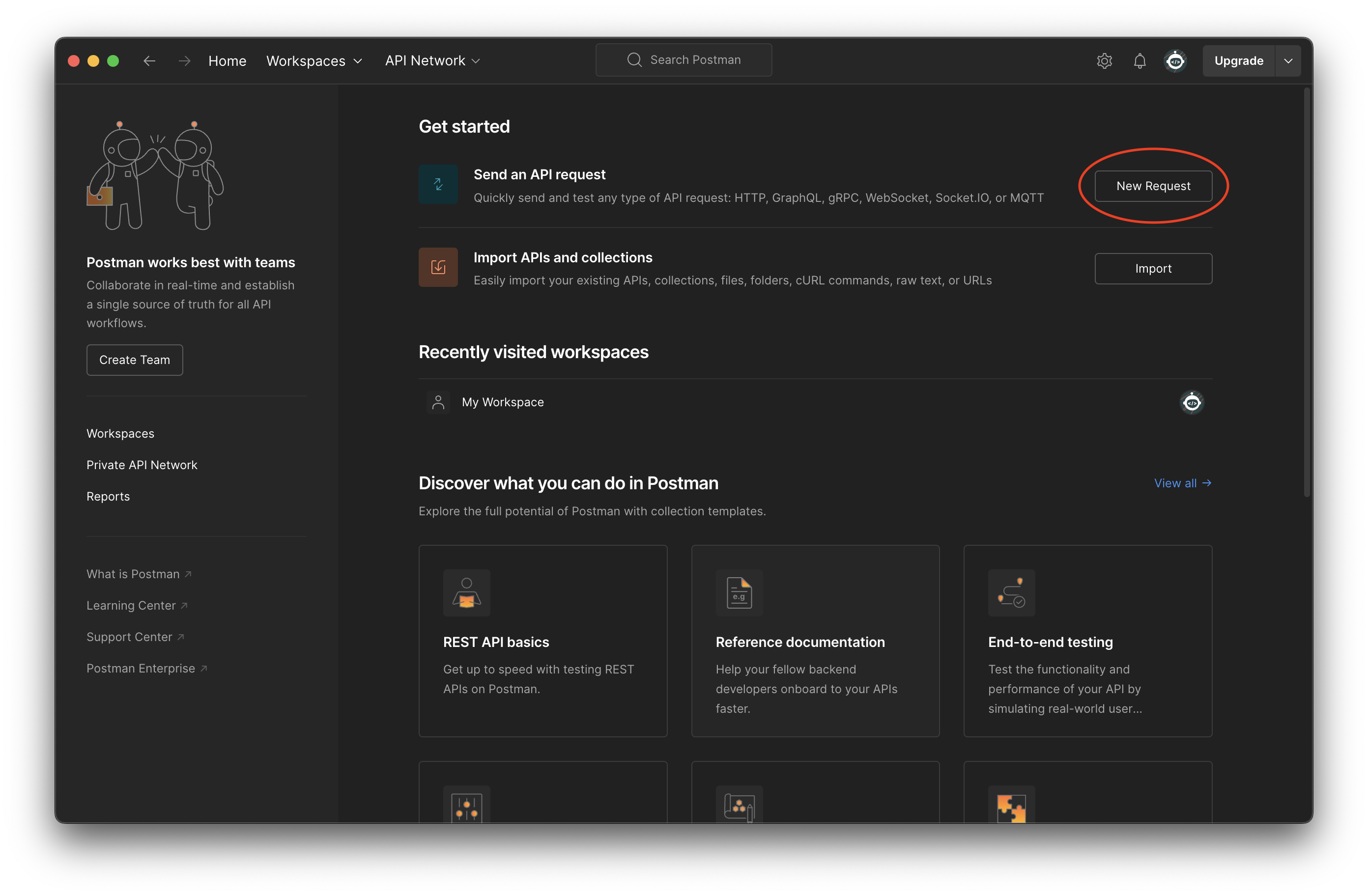
When you open Postman for the first time, you should see a screen similar to the one below. Click New Request to open a window where you can enter the request details:
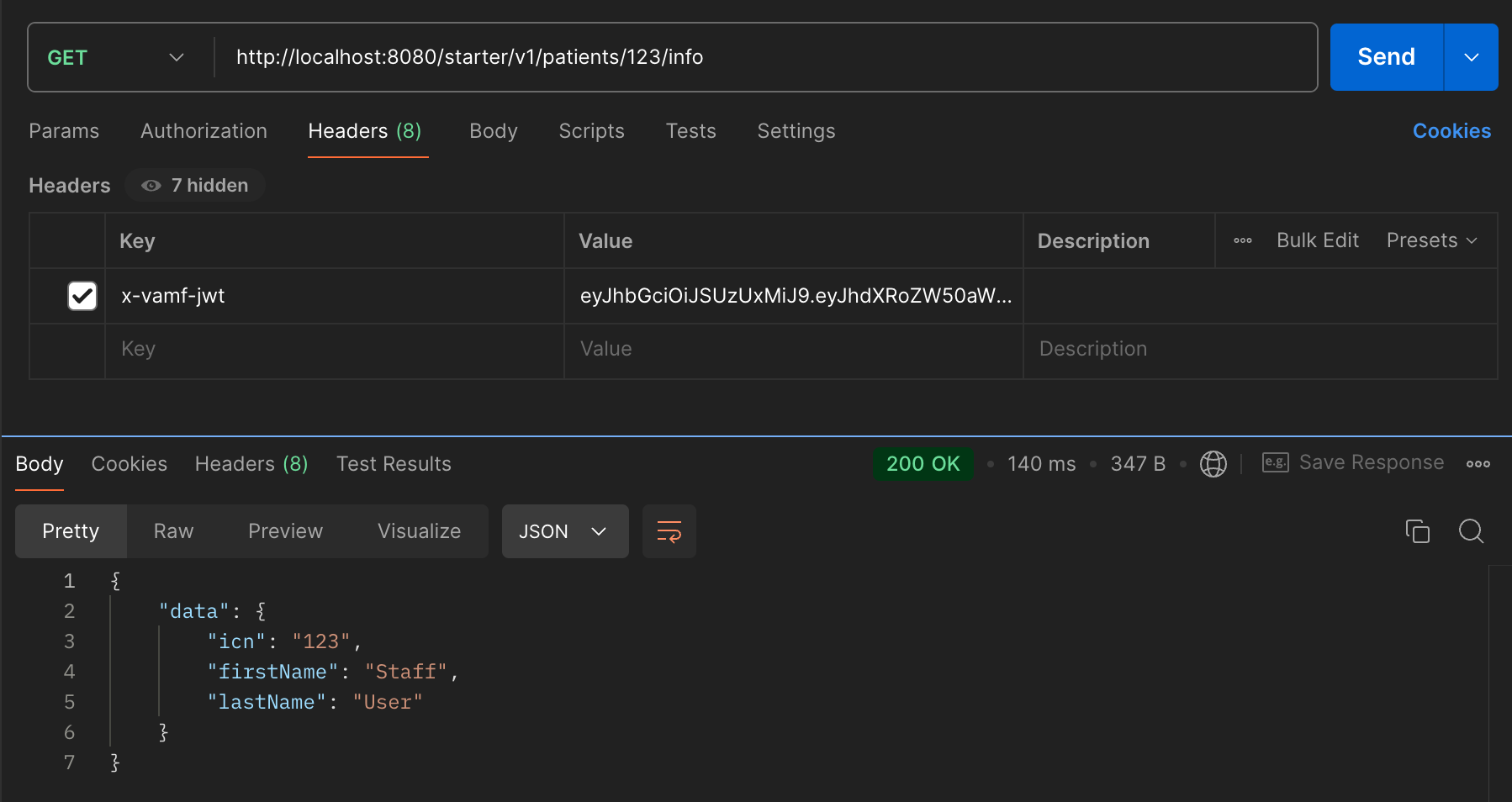
Enter the HTTP method, URL, and the x-vamf-jwt header, then click Send to submit the request. To run the same GET request from above in Postman, your setup should look similar to this:
Once done testing, Ctrl-C out of the running process and execute a skaffold delete to clean up the deployment.
Other Useful Libraries/Frameworks
Before you begin modifying the starter-service, it is recommended that you pull down and examine the following repositories before continuing:
Mobile Framework
git clone https://coderepo.mobilehealth.va.gov/scm/ckm/mobile-framework.gitNGSS-Maven-Tiles
git clone https://coderepo.mobilehealth.va.gov/scm/ckm/ngss-maven-tiles.gitThese comprise two major parts of most of our services: the dependency management and the Maven configuration and tooling used to build our services. Many questions can be answered from an examination of these two projects.
If you are an SRE, switch to the SRE Starter here. Otherwise, continue to the next section to start modifying your service.